The data shown in this Pro Tip can now also be scanned by default through the Intune Cloud discovery action.
Continuing the Journey of Asset Compliance – with Flow Builder, Custom Fields, and inTune integration.
Everyone knows that Lansweeper excels in providing valuable insights and enriching any other system that it integrates with… but not too many know that you can import information from other systems – making Lansweeper a powerhouse for true IT Asset Management. In other words:
The more data you GIVE Lansweeper, the more powerful it becomes.
I love setting up Lansweeper in an environment – using it’s unmatched device recognition and scanning, and having everything accounted for and properly classified… but the part that I enjoy the most, is integrating with other systems – and taking a few key points of data from each of them. What does that give me? A true (if not cliche) single point of glass for asset management and compliance.
In the past, this was pretty complicated, and caused many-a-sysadmin countless headaches – but now, with the introduction of Lansweeper’s Flow Builder, things have just gotten much, much easier! For Beta access, sign up now at https://www.lansweeper.com/product/beta/
In this article, we will use Flow Builder to get asset information from inTune , and write to custom fields for applicable assets – and you will be able to apply this methodology to practically any other system that has an API to take your compliance to a whole new level.
From this integration – you will now know:
This article is the first step – grabbing the info. The next article in this series will be to take the information we gathered, and use it to our advantage – enhancing Intune groups to be targeted and dynamic, to get the most out of your deployments and security configurations.
I’m going to go ahead and sign-off up here because the below walkthrough is long – Remember: Lansweeper gets even stronger when you take in data from other systems. With Flow Builder, you can now easily make that happen.
-Happy Sweeping, Everyone! -Jacob
Before you begin, make sure you have:
If you would like to skip making the workflow from scratch, you can download and import the file here:
To use the Microsoft Intune Connector, you’ll need to register an app in Azure and assign Microsoft Graph API permissions that allow reading and optionally modifying device data (we will need to modify data in the next article where we modify groups). Official instructions can be found here: https://docs.lansweeper.com/docs/microsoft-intune-connector
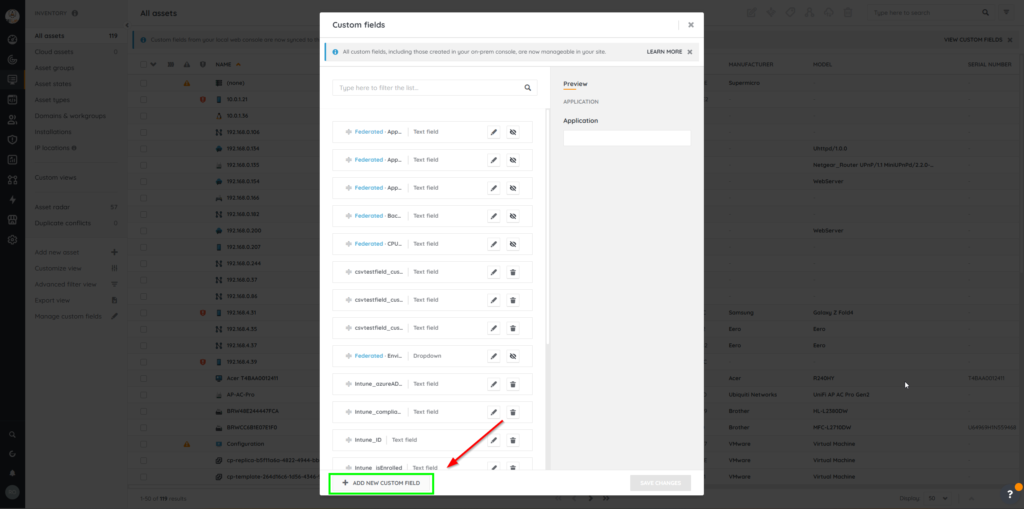
The following custom fields need to be created:
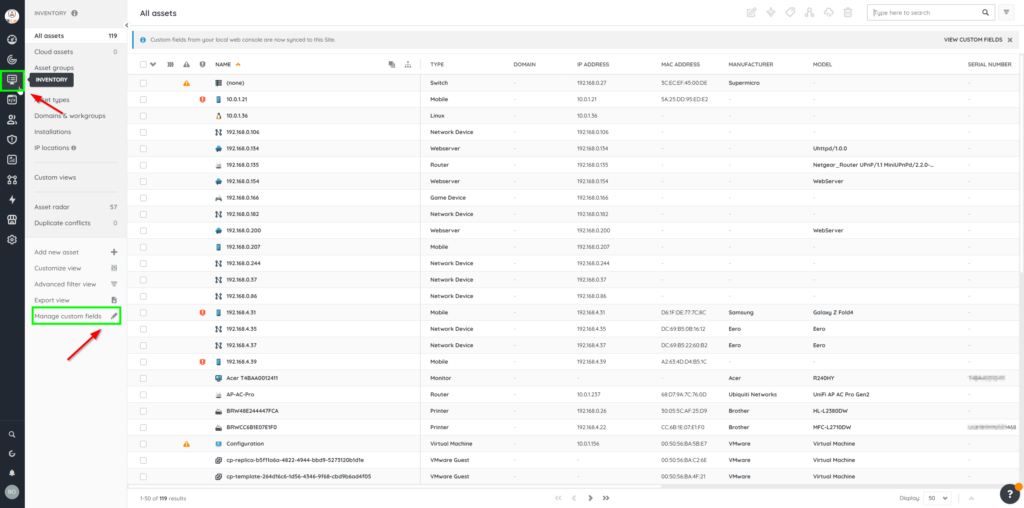
In Lansweeper Sites: Navigate to Inventory > Manage Custom Fields

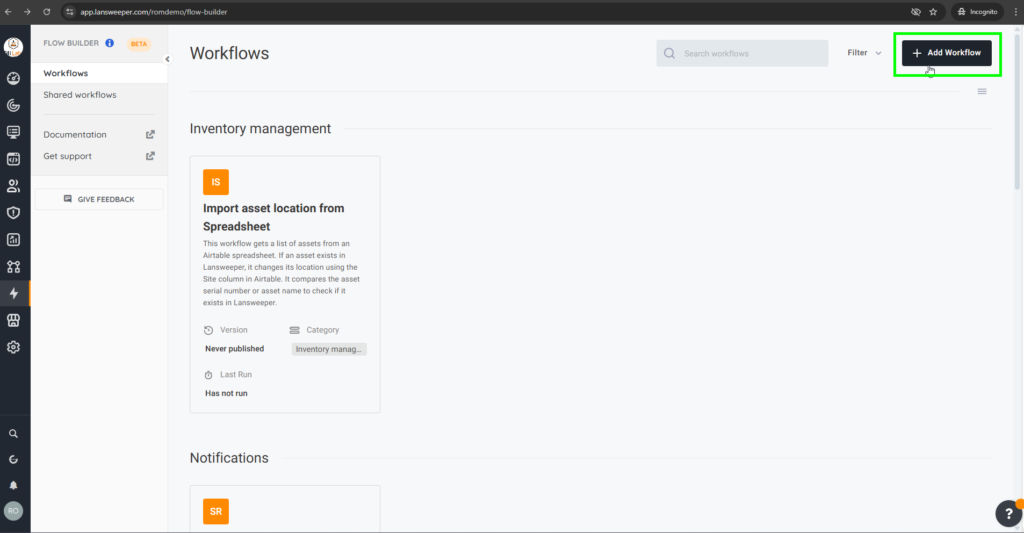
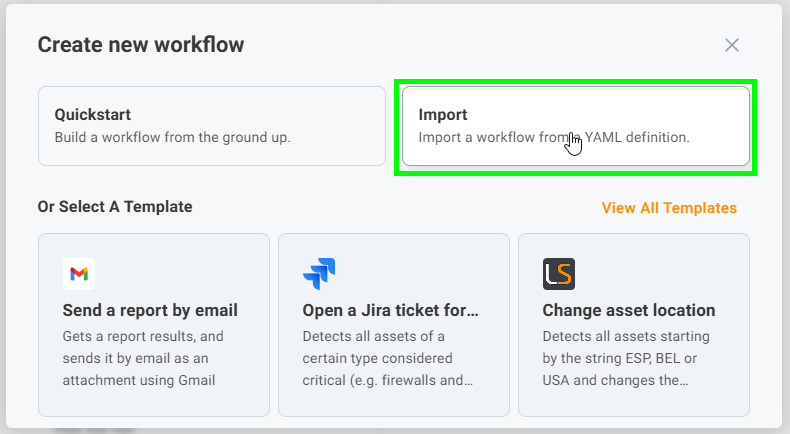
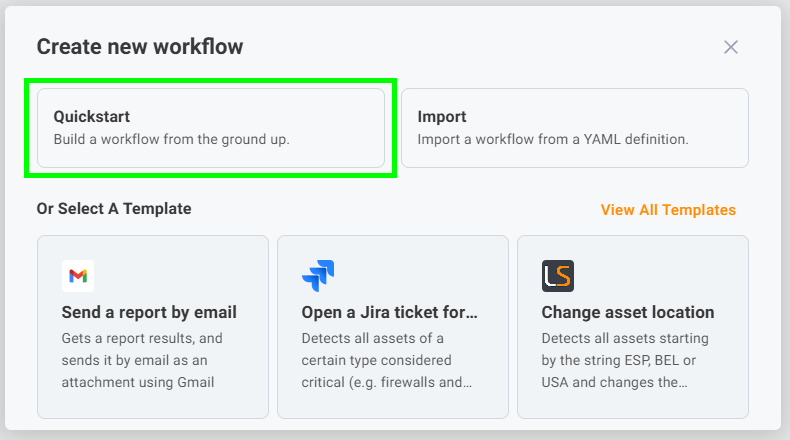
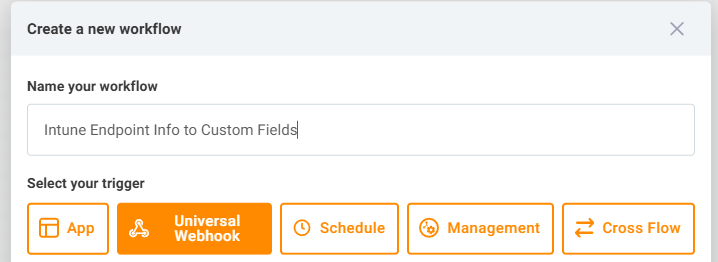
(This starts your flow when something (like a button or scheduler) sends a request to a special webhook URL that Lansweeper provides.)
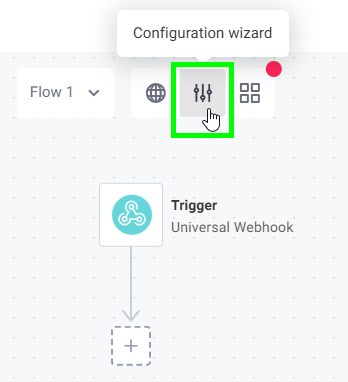
Click on the ‘Configuration Wizard’ button to add your connections
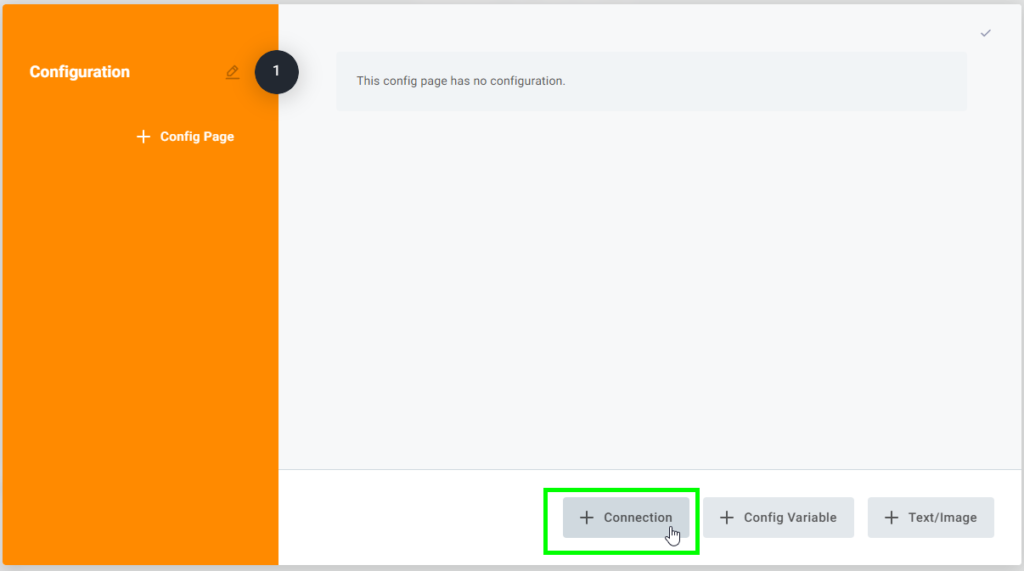
Add the Lansweeper Connection by searching for it in the filter

Leave everything as it is, and just press ‘Create’
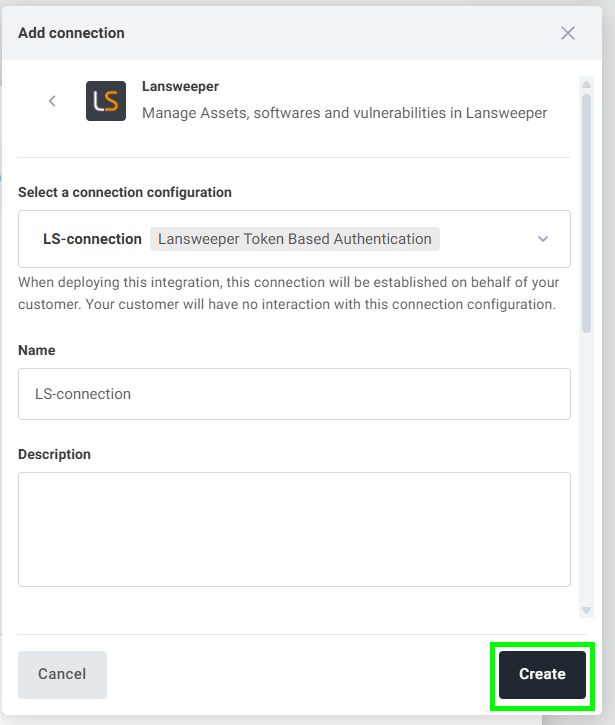
(Don’t forget to follow the prerequisite and set up access in Azure to allow the Intune Connector)
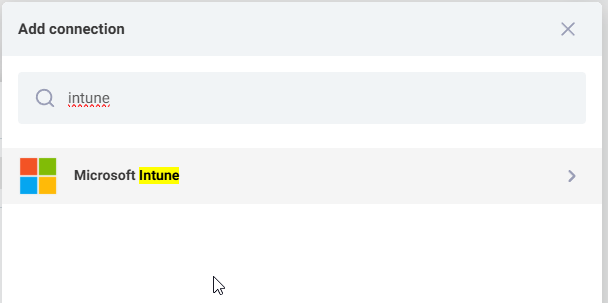
Add The ‘Microsoft Intune’ connector
Paste the Client ID and Client Secret that you generated in Azure and then click ‘Create’
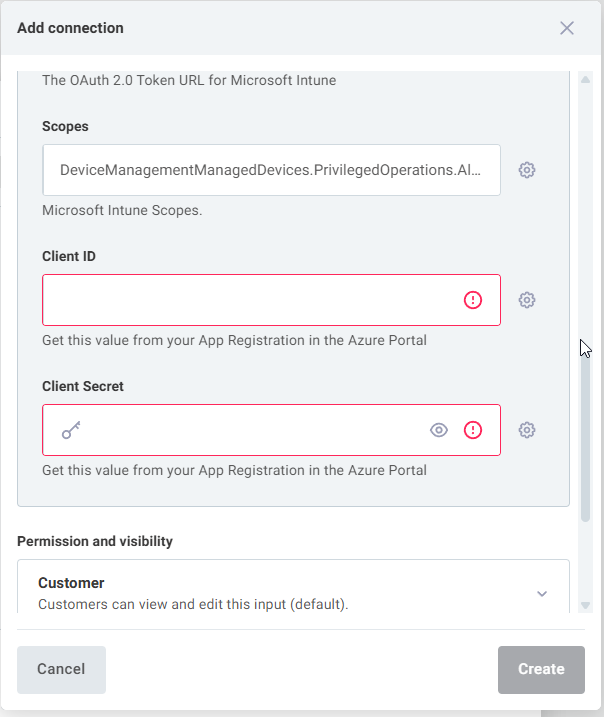
Note: The connection will throw an error at the bottom of the workflow, displayed as a red dot – you will need to click and authenticate the inTune connector to M365 by entering in M365 credentials.


This pulls a list of Windows devices from Lansweeper, including key identifiers like serial number, IP address, FQDN, and MAC address. These will be used to try and match with Intune devices.


{
  "conjunction": "AND",
  "conditions": [
    {
      "path": "assetBasicInfo.type",
      "operator": "EQUAL",
      "value": "Windows"
    }
  ]
}

This pulls all devices that are currently enrolled and managed in Microsoft Intune. These will be compared to your Lansweeper assets.


This code compares serial numbers and device names from both systems and builds a list of matched devices. It adds helpful info like compliance status and sync time.


module.exports = async ({ logger, configVars }, stepResults) => {
  // Retrieve Lansweeper assets and Intune devices
  const lansweeperAssets = stepResults.listLansweeperAssets.results.items || [];
  const intuneDevices = stepResults.listIntuneDevices.results.value || [];

  logger.info(`Processing ${lansweeperAssets.length} Lansweeper assets and ${intuneDevices.length} Intune devices.`);

  // Create lookup maps for Intune devices (Serial Number & Device Name)
  const intuneSerialMap = new Map();
  const intuneNameMap = new Map();

  intuneDevices.forEach(device => {
    const serial = device.serialNumber ? device.serialNumber.toLowerCase().trim() : "";
    const name = device.deviceName ? device.deviceName.toLowerCase().trim() : "";

    if (serial && serial !== "defaultstring" && serial !== "systemserialnumber") {
      intuneSerialMap.set(serial, {
        ...device,
        deviceId: device.id || "Unknown", // Ensure Intune Device ID is stored
        lastSyncDateTime: device.lastSyncDateTime || "N/A",
        complianceState: device.complianceState || "Unknown"
      });
    }
    if (name) {
      intuneNameMap.set(name, {
        ...device,
        deviceId: device.id || "Unknown",
        lastSyncDateTime: device.lastSyncDateTime || "N/A",
        complianceState: device.complianceState || "Unknown"
      });
    }
  });
   logger.info(`Created Intune lookup maps: ${intuneSerialMap.size} serials, ${intuneNameMap.size} names.`);

  // Arrays to store results
  const matchedAssets = [];
  const unmatchedAssets = [];

  lansweeperAssets.forEach(asset => {
    const lsSerial = asset.assetCustom?.serialNumber ? asset.assetCustom.serialNumber.toLowerCase().trim() : "";
    const lsName = asset.assetBasicInfo?.name ? asset.assetBasicInfo.name.toLowerCase().trim() : "";
    let matchedDevice = null;
    let matchMethod = "";

    // **First priority: Match by Serial Number**
    if (lsSerial && lsSerial !== "defaultstring" && lsSerial !== "systemserialnumber" && intuneSerialMap.has(lsSerial)) {
      matchedDevice = intuneSerialMap.get(lsSerial);
      matchMethod = "Serial Number";
    }

    // **Second priority: Match by Device Name** (only if serial didn't match)
    if (!matchedDevice && lsName && intuneNameMap.has(lsName)) {
      matchedDevice = intuneNameMap.get(lsName);
      matchMethod = "Device Name";
    }

    // **Categorize the asset**
    if (matchedDevice) {
      // Add to matched list with combined data
      matchedAssets.push({
        key: asset.key, // Lansweeper asset key
        matchedOn: matchMethod, // Indicate match method
        assetBasicInfo: asset.assetBasicInfo, // Retain LS asset details
        assetCustom: asset.assetCustom, // Retain LS asset details
        // Add Intune details
        intune_deviceId: matchedDevice.deviceId,
        intune_lastSyncDateTime: matchedDevice.lastSyncDateTime,
        intune_complianceState: matchedDevice.complianceState,
        intune_azureADDeviceId: matchedDevice.azureADDeviceId // Assuming this exists on device object
        // Add other relevant Intune fields if needed
      });
    } else {
      // Add to unmatched list with just Lansweeper data needed for update
      unmatchedAssets.push({
        key: asset.key, // Lansweeper asset key is essential
        assetBasicInfo: asset.assetBasicInfo, // Include basic info if needed later
        assetCustom: asset.assetCustom // Include custom info if needed later
      });
    }
  });

  logger.info(`Identified ${matchedAssets.length} matched assets and ${unmatchedAssets.length} unmatched assets.`);

  // Return both lists
  return { matched: matchedAssets, unmatched: unmatchedAssets };
};

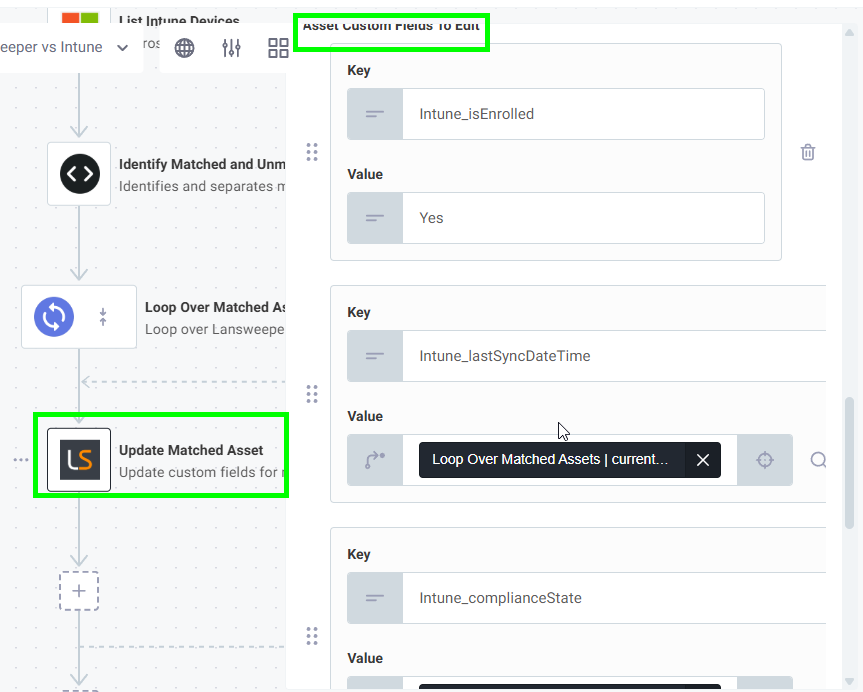
For every matched device, it will repeat a set of steps — in our case, to update the corresponding asset in Lansweeper.


This updates each matched Lansweeper asset with Intune-specific info like whether it’s enrolled, when it last synced, and its compliance state.

| Field Name | Type | Value |
|---|---|---|
| Intune_isEnrolled | value | Yes |
| Intune_lastSyncDateTime | reference | Loop Over Matched Assets.currentItem.lastSyncDateTime |
| Intune_complianceState | reference | Loop Over Matched Assets.currentItem.complianceState |
| Intune_ID | reference | Loop Over Matched Assets.currentItem.assetCustom.Intune_ID |
| Intune_azureADDeviceId | reference | Loop Over Matched Assets.currentItem.azureADDeviceId |
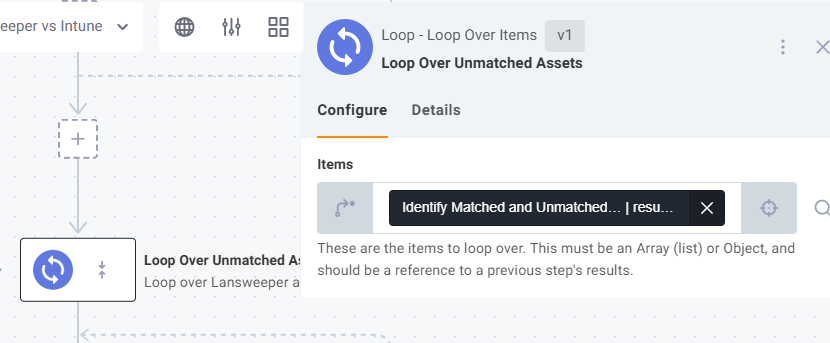
For every unmatched device, it will repeat a set of steps — in our case, to update the corresponding asset in Lansweeper.
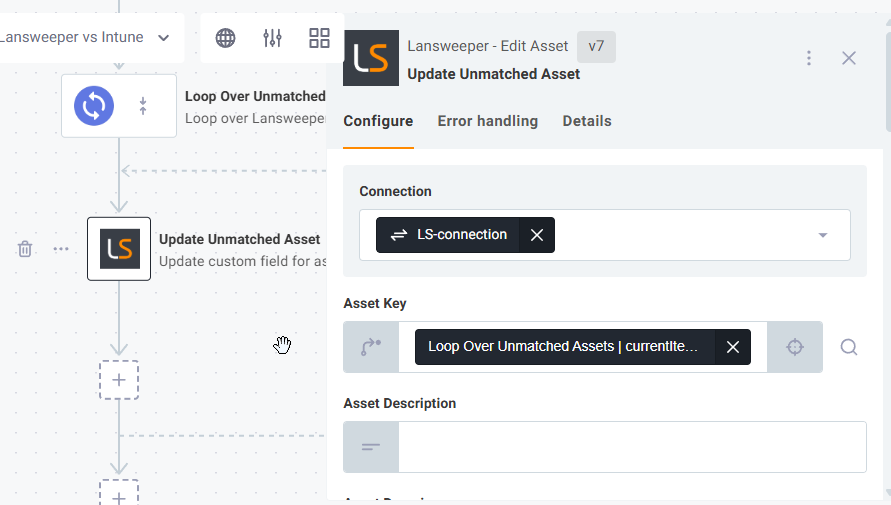
This updates each matched Lansweeper asset with Intune-specific info like whether it’s enrolled, when it last synced, and its compliance state.
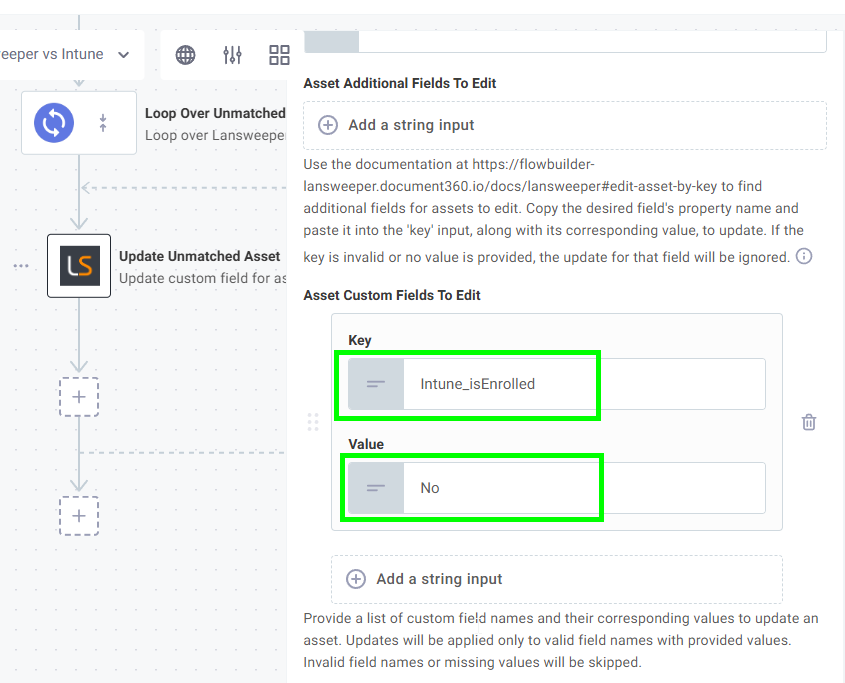
| Field Name | Type | Value |
|---|---|---|
| Intune_isEnrolled | value | No |
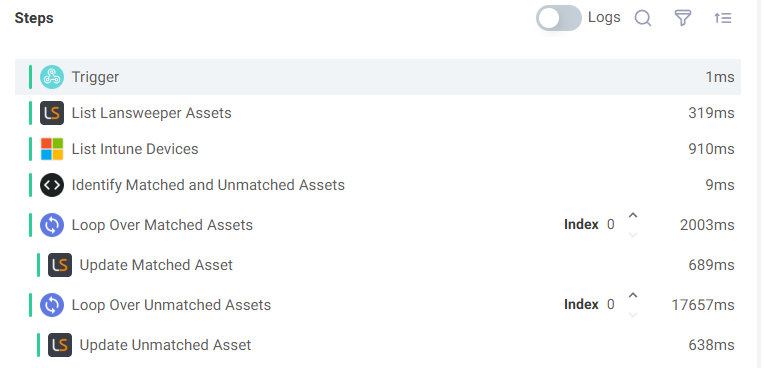

Add temporary log steps (like Log Message) between steps to see data mid-flow.
Code Block Walkthrough: “Identify Matched and Unmatched Assets”
Purpose: This code acts like a fast sorter, comparing Lansweeper computers to Intune devices and creating two lists: those found in Intune (“Matched”) and those not found (“Unmatched”).
// Retrieve Lansweeper assets and Intune devices
const lansweeperAssets = stepResults.listLansweeperAssets.results.items || [];
const intuneDevices = stepResults.listIntuneDevices.results.value || [];

logger.info(`Processing ${lansweeperAssets.length} Lansweeper assets and ${intuneDevices.length} Intune devices.`);// Create lookup maps for Intune devices (Serial Number & Device Name)
const intuneSerialMap = new Map();
const intuneNameMap = new Map();
intuneDevices.forEach(device => {
const serial = device.serialNumber ? device.serialNumber.toLowerCase().trim() : "";
const name = device.deviceName ? device.deviceName.toLowerCase().trim() : "";
// Clean up serial number and add to Serial Map
if (serial && serial !== "defaultstring" && serial !== "systemserialnumber") {
intuneSerialMap.set(serial, {
...device, // Include all original Intune device details
deviceId: device.id || "Unknown", // Ensure Intune Device ID is stored
lastSyncDateTime: device.lastSyncDateTime || "N/A",
complianceState: device.complianceState || "Unknown"
});
}
// Add to Name Map
if (name) {
intuneNameMap.set(name, {
...device, // Include all original Intune device details
deviceId: device.id || "Unknown",
lastSyncDateTime: device.lastSyncDateTime || "N/A",
complianceState: device.complianceState || "Unknown"
});
}
});
logger.info(`Created Intune lookup maps: ${intuneSerialMap.size} serials, ${intuneNameMap.size} names.`);// Arrays to store results
const matchedAssets = [];
const unmatchedAssets = [];lansweeperAssets.forEach(asset => {
// Inside this loop, we process one Lansweeper asset at a time
const lsSerial = asset.assetCustom?.serialNumber ? asset.assetCustom.serialNumber.toLowerCase().trim() : "";
const lsName = asset.assetBasicInfo?.name ? asset.assetBasicInfo.name.toLowerCase().trim() : "";
let matchedDevice = null; // Variable to store the matching Intune device, if found
let matchMethod = ""; // Variable to store how we matched it // **First priority: Match by Serial Number**
if (lsSerial && lsSerial !== "defaultstring" && lsSerial !== "systemserialnumber" && intuneSerialMap.has(lsSerial)) {
matchedDevice = intuneSerialMap.get(lsSerial); // Get the Intune device details from the map
matchMethod = "Serial Number";
}// **Second priority: Match by Device Name** (only if serial didn't match)
if (!matchedDevice && lsName && intuneNameMap.has(lsName)) {
matchedDevice = intuneNameMap.get(lsName); // Get the Intune device details from the map
matchMethod = "Device Name";
} // **Categorize the asset**
if (matchedDevice) {
// Add to matched list with combined data
matchedAssets.push({
key: asset.key, // Lansweeper asset key (needed for updating)
matchedOn: matchMethod, // Indicate how we matched
assetBasicInfo: asset.assetBasicInfo, // Keep original LS details
assetCustom: asset.assetCustom, // Keep original LS details
// Add specific Intune details needed for the update step
intune_deviceId: matchedDevice.deviceId,
intune_lastSyncDateTime: matchedDevice.lastSyncDateTime,
intune_complianceState: matchedDevice.complianceState,
intune_azureADDeviceId: matchedDevice.azureADDeviceId // Add Azure AD ID if available
// Add other relevant Intune fields if needed
});
} else {
// Add to unmatched list (only need Lansweeper key usually)
unmatchedAssets.push({
key: asset.key, // Lansweeper asset key is essential
assetBasicInfo: asset.assetBasicInfo, // Include if needed later
assetCustom: asset.assetCustom // Include if needed later
});
}
}); // End of the loop processing each Lansweeper assetlogger.info(`Identified ${matchedAssets.length} matched assets and ${unmatchedAssets.length} unmatched assets.`);
// Return both lists for subsequent steps to use
return { matched: matchedAssets, unmatched: unmatchedAssets };Explore Lansweeper for free.
No credit card required.