


Tenable is one of the flagship exposure management solutions out there, making it a prime target to see how we can combine it best with Lansweeper to power-up both platforms. We’ll look at enriching Lansweeper assets, enriching Tenable assets for the creation of dynamic tags, and filling in blind spots in each product.
Let’s start with the components that make this all possible. We have four workflows and a dashboard that are used to get the full value out of the combination of Lansweeper en Tenable. Each workflow can be separately enabled so you can customize exactly what your setup looks like.
Do you only want to send data to Tenable? That’s possible. Only want to ingest data into Lansweeper? Also possible. Its all up to you.
The included templates are:
We’ll start by looking at what you get inside of Lansweeper. These are just examples, and as with any workflows, if you’d like to pull back other data points, you can adjust the workflows to do so. Very simply said you’ll get the following data for each asset:
These data point can help you in two ways. First, you’ll be able to work more closely with your SOC team to ensure that Tenable has full coverage and has no stale data (assets in Tenable go unmanaged after 90 days of no activity).
Second, by having ACR Score and AES Score this can be combined with Lansweeper’s risk insight, meaning you can filter your assets on all assets with an EPSS score over 80% and with an Tenable ACR score over 8.
This can then all be combined into a dashboard so you can easily navigate and interrogate that data across your entire inventory.
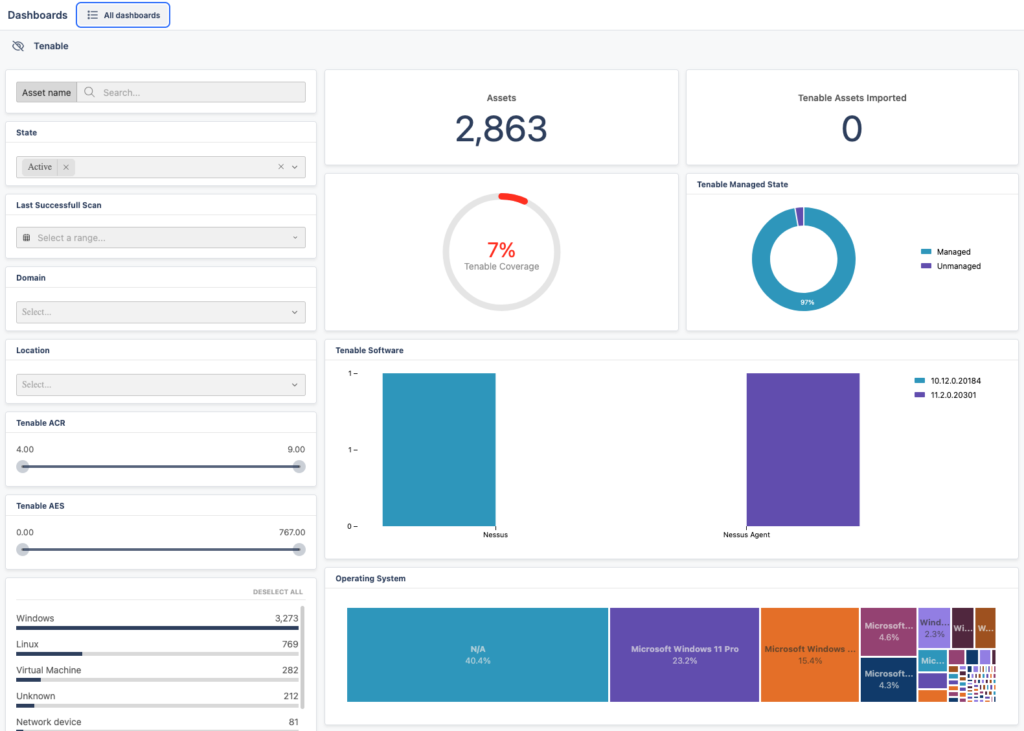
Last but not least, to to ensure both Tenable and Lansweeper have the same assets and nothing is missing, you can use the Pull workflow to pull missing assets from Tenable into Lansweeper. If your Lansweeper discovery configuration was not configured for a specific subnet, this way you’ll still know something is there.
For enriching Tenable, similar to the Lansweeper one, the data that is enriched is just an example, and you can adjust the workflows. By default the workflows adds the following data as custom attributes to Tenable assets:
Whats more interesting is what you can do with the data you push into Tenable. Tenable is rather reliant on asset tags, it uses these for scoping exposure initiatives, remediation ownership, prioritization context and more. These are vital to how Tenable is used and you can create dynamic tags based on custom attributes.
This means you can use Lansweeper data to create dynamic asset tags to enhance your Tenable usage. For example a criticality tier tag based on whether an asset is a primary domain controller.
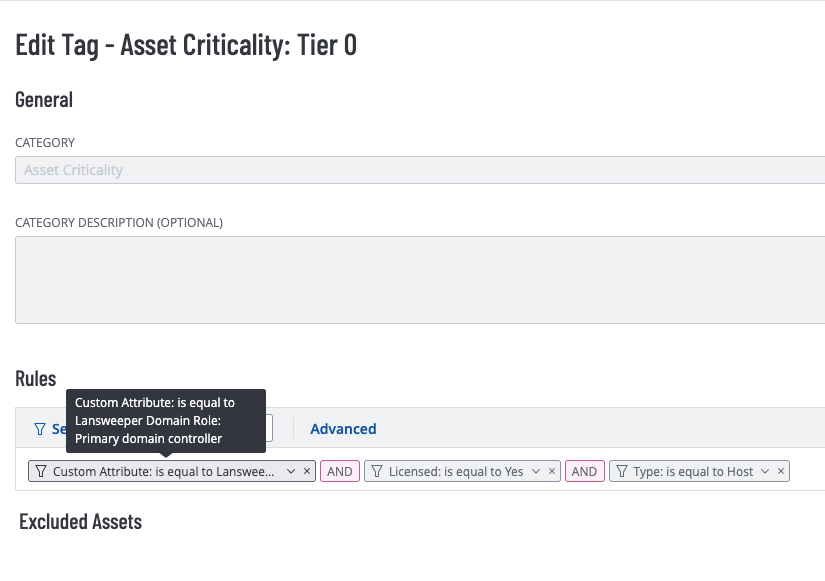
You can also push assets from Lansweeper to Tenable to ensure that any assets Tenable might be missing are added, again, to ensure that you have a record in each product of devices that are missing so you can review your discovery configuration and ensure full coverage.
By using Lansweeper data to strengthen your tagging in Tenable, you’ll also be able to use Tenable more efficiently and in new ways.
Blog





Explore the full platform, free for 14 days.
No credit card required.