

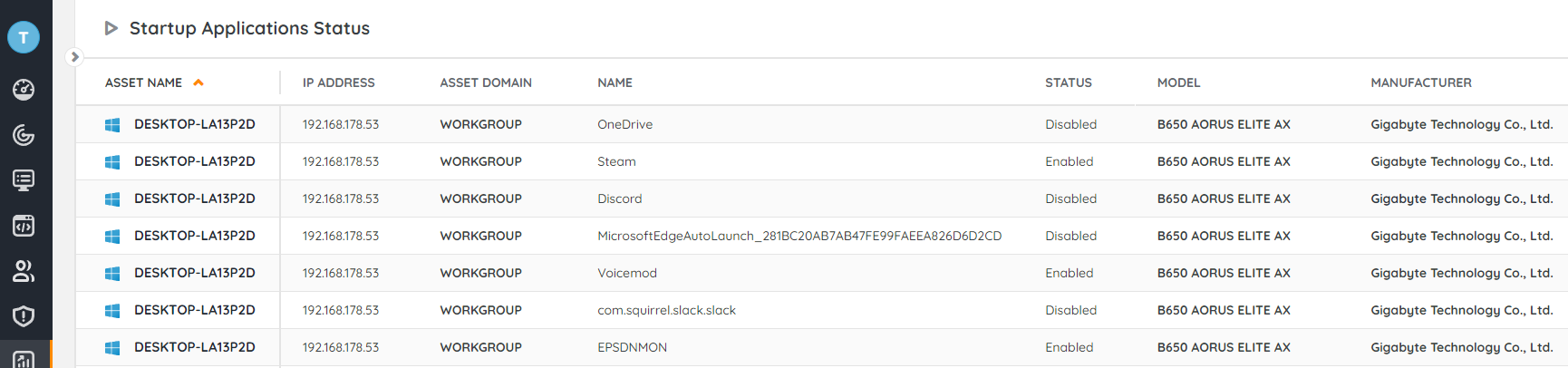
Discover which Startup apps are running on your devices along with the status of those startup applications. You’ll be able to get an overview of whether they are enabled or disabled. This overview offers multiple benefits, including optimizing performance by identifying and disabling unnecessary programs, managing system resources more effectively, enhancing security by detecting malware and potentially unwanted software, troubleshooting startup issues, protecting privacy by preventing unauthorized programs from running, customizing startup behavior to streamline the computing experience, cleaning up unnecessary entries to improve system efficiency, and ultimately reducing boot times for a smoother user experience.
Before running the audit, additional steps must be taken and specific registry keys must be added to your custom registry scanning. You can find the steps in Pro Tips 53
Select Distinct Top 1000000 tblAssets.AssetID,
  tblAssets.AssetName,
  tsysOS.OSname As OS,
  tblAssets.Version,
  tblAutorunUni.Caption [Startup Application],
Case
    When SubQuery1.Status Is Null Then 'Unknown'
    Else SubQuery1.Status
  End As Status,
  tblAssets.Domain,
  tblAssets.Username,
  Coalesce(tsysOS.Image, tsysAssetTypes.AssetTypeIcon10) As icon,
  tblAssets.IPAddress,
  tsysIPLocations.IPLocation,
  tblAssets.Lastseen,
  tblAssets.Lasttried,
  tblAutorun.Lastchanged
From tblAssets
  Inner Join tblAssetCustom On tblAssets.AssetID = tblAssetCustom.AssetID
  Inner Join tsysAssetTypes On tsysAssetTypes.AssetType = tblAssets.Assettype
  Inner Join tsysIPLocations On tsysIPLocations.LocationID =
      tblAssets.LocationID
  Inner Join tblAutorun On tblAssets.AssetID = tblAutorun.AssetID
  Inner Join tblAutorunUni On tblAutorun.AutorunUNI = tblAutorunUni.AutorunUNI
  Inner Join tblRegistry On tblRegistry.AssetID = tblAssets.AssetID
  Left Join tsysOS On tsysOS.OScode = tblAssets.OScode
  Left Join (Select Top 1000000 tblRegistry.AssetID,
      Replace(SubString(tblRegistry.Value, 1, CharIndex(';', tblRegistry.Value +
      ';') - 1), '.lnk', '') As Name,
      Case
        When SubString(tblRegistry.Value, CharIndex(';', tblRegistry.Value) + 1,
          Len(tblRegistry.Value)) Like '2%' Then 'Enabled'
        When SubString(tblRegistry.Value, CharIndex(';', tblRegistry.Value) + 1,
          Len(tblRegistry.Value)) Like '4%' Then 'Enabled'
        When SubString(tblRegistry.Value, CharIndex(';', tblRegistry.Value) + 1,
          Len(tblRegistry.Value)) Like '6%' Then 'Enabled'
        When SubString(tblRegistry.Value, CharIndex(';', tblRegistry.Value) + 1,
          Len(tblRegistry.Value)) Like '1%' Then 'Disabled'
        When SubString(tblRegistry.Value, CharIndex(';', tblRegistry.Value) + 1,
          Len(tblRegistry.Value)) Like '3%' Then 'Disabled'
        When SubString(tblRegistry.Value, CharIndex(';', tblRegistry.Value) + 1,
          Len(tblRegistry.Value)) Like '5%' Then 'Disabled'
        When SubString(tblRegistry.Value, CharIndex(';', tblRegistry.Value) + 1,
          Len(tblRegistry.Value)) Like '9%' Then 'Disabled'
      End As Status
    From tblRegistry
    Where tblRegistry.Regkey = 'HKEY_LOCAL_MACHINE\SYSTEM\Startup' And
      tblRegistry.Valuename In ('0', '1', '2', '3', '4', '5', '6', '7', '8',
      '9', '10', '11', '12', '13', '14', '15', '16', '17', '18', '19',
      '20')) SubQuery1 On SubQuery1.Name = tblAutorunUni.Caption
Where tblAssetCustom.State = 1 and tblRegistry.Regkey = 'HKEY_LOCAL_MACHINE\SYSTEM\Startup'
Order By tblAssets.Domain,
  tblAssets.AssetName
Explore Lansweeper for free.
No credit card required.