

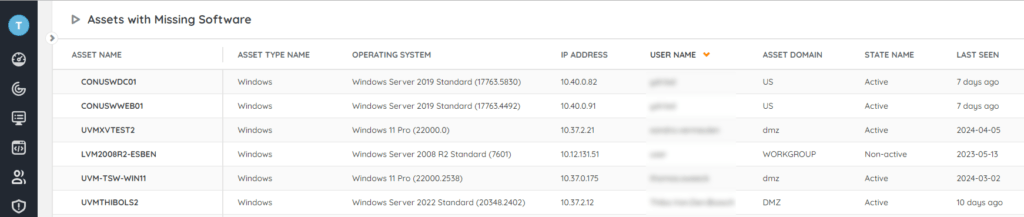
Find computers which do not have a specific software package installed on them with the audit.
Find computers in your environment which are still missing software that should be installed. Once you have identified the assets which are missing the software, you can start deploying in your environment. This audit can also be used in combination with the Lansweeper on-prem deployment module where you can use it as a list of machines to deploy on. As deployments are done and assets are rescanned, Lansweeper will detect that the software has been installed and the entries in the audit will be removed.
You can find more info on this use case in the Pro Tips 55 blog post.
Run The Assets With Missing Software Audit Now!
Select Top 1000000 tsysOS.Image As icon,
  tblAssets.AssetID,
  tblAssets.AssetName,
  tblAssets.Domain,
  tblAssets.Username,
  tblAssets.Userdomain,
  tblAssets.IPAddress,
  tblAssets.Firstseen,
  tblAssets.Lastseen,
  tblAssets.Lasttried
From tblAssets
  Inner Join tblAssetCustom On tblAssets.AssetID = tblAssetCustom.AssetID
  Inner Join tsysOS On tsysOS.OScode = tblAssets.OScode
Where tblAssets.AssetID Not In (Select Top 1000000 tblSoftware.AssetID
  From tblSoftware Inner Join tblSoftwareUni On tblSoftwareUni.SoftID =
      tblSoftware.softID
  Where tblSoftwareUni.softwareName Like '%YourSoftware%') And
  tblAssetCustom.State = 1
Order By tblAssets.Domain,
  tblAssets.AssetName
Explore Lansweeper for free.
No credit card required.