Reports

Specific Windows Software Installed Audit

Find Computers and Users with Specific Software Installed

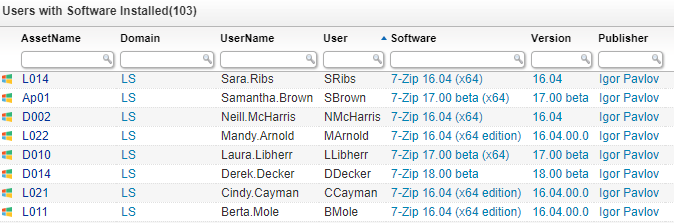
Just like hardware information, keeping track of software information is essential for businesses. Not only to ensure that all the required software is present for an employee, but also to make sure that you know when software is out of date. Additionally, if users are able to install software themselves, you can always keep track on what software they have installed to take action when malicious software is detected. With the audit below you can find exactly which user have your specified Windows software installed. We have a similar report for Windows, Linux and Mac.
Before running this report you will need to replace “ExampleSoftware” with the software name you are looking for.
Users with Software Installed

Users with Software Installed Query

Select Top 1000000 tblAssets.AssetID,
  tblAssets.AssetUnique,
  tblAssets.Domain,
  tblAssets.Username,
  tblADusers.Displayname As [User],
  tblSoftwareUni.softwareName As software,
  tblSoftware.softwareVersion As version,
  tblSoftwareUni.SoftwarePublisher As publisher,
  tsysOS.Image As icon
From tblSoftware
  Inner Join tblAssets On tblSoftware.AssetID = tblAssets.AssetID
  Inner Join tblSoftwareUni On tblSoftware.softID = tblSoftwareUni.SoftID
  Inner Join tblAssetCustom On tblAssets.AssetID = tblAssetCustom.AssetID
  Inner Join tsysOS On tblAssets.OScode = tsysOS.OScode
  Left Join tblADusers On tblADusers.Username = tblAssets.Username And
    tblADusers.Userdomain = tblAssets.Userdomain
Where tblSoftwareUni.softwareName Like '%ExampleSoftware%' And
  tblAssetCustom.State = 1
Order By tblAssets.AssetName,
  software,
  version

Show

Hide

Ready to get started?

Explore the full platform, free for 14 days.
No credit card required.

Need help evaluating?
Get guidance on pricing at scale and enterprise requirements.
Talk to sales
Clear pricing as you grow
Transparent plans that scale with your environment.
View plans & pricing