

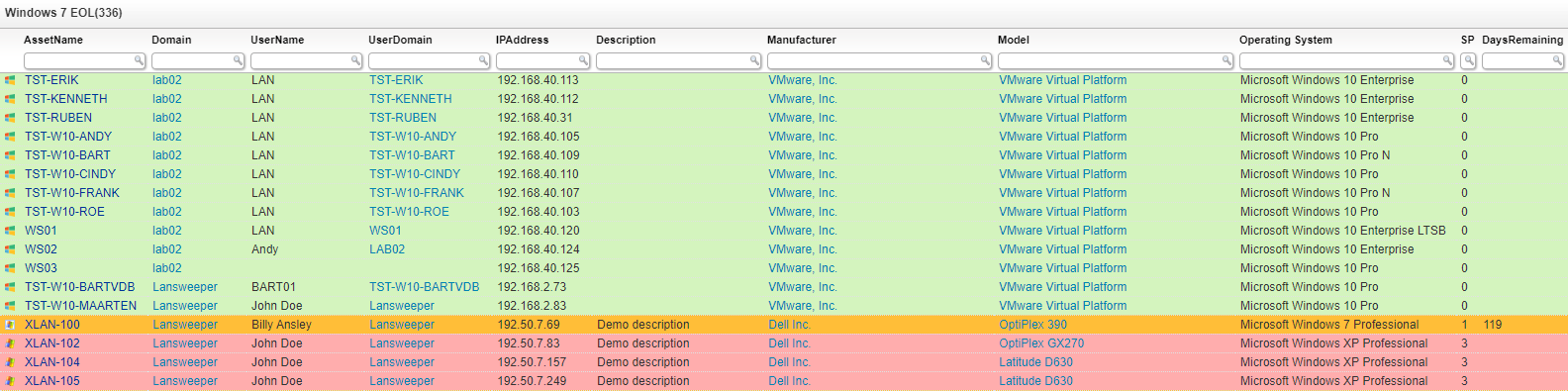
Select Top 1000000 tsysOS.Image As icon,
  tblAssets.AssetID,
  tblAssets.AssetName,
  tblAssets.Domain,
  tblAssets.Username,
  tblAssets.Userdomain,
  tblAssets.IPAddress,
  tblAssets.Description,
  tblAssetCustom.Manufacturer,
  tblAssetCustom.Model,
  tblOperatingsystem.Caption As [Operating System],
  tblAssets.SP As SP,
  Case
    When tsysOS.OSname = 'Win 7' And tblAssets.SP = 1 Then DateDiff(dd,
      GetDate(), '01/14/2020')
  End As DaysRemaining,
  tblAssetCustom.Location,
  tsysIPLocations.IPLocation,
  tblAssets.Firstseen,
  tblAssets.Lastseen,
  tblAssets.Lasttried,
  Case
    When tsysOS.OSname = 'Win XP' Then '#ffadad'
    When tsysOS.OSname = 'Win 7' And tblAssets.SP <> 1 Then '#ffdb8e'
    When tsysOS.OSname = 'Win 7' And tblAssets.SP = 1 Then '#ffbe38'
    When GetDate() > '01/14/2019' And GetDate() < '01/14/2020' And
      tsysOS.OSname = 'Win 7' And tblAssets.SP = 1 Then '#ff8b00'
    When GetDate() > '01/14/2020' And tsysOS.OSname = 'Win 7' And
      tblAssets.SP = 1 Then '#ffadad'
    Else '#d4f4be'
  End As backgroundcolor
From tblAssets
  Inner Join tblAssetCustom On tblAssets.AssetID = tblAssetCustom.AssetID
  Inner Join tsysOS On tsysOS.OScode = tblAssets.OScode
  Left Join tsysIPLocations On tsysIPLocations.LocationID = tblAssets.LocationID
  Inner Join tblComputersystem On tblAssets.AssetID = tblComputersystem.AssetID
  Inner Join tblOperatingsystem On
    tblAssets.AssetID = tblOperatingsystem.AssetID
Where tblComputersystem.Domainrole < 2 And tblAssetCustom.State = 1
Order By tblAssets.Domain,
  tblAssets.AssetName
Explore Lansweeper for free.
No credit card required.
