

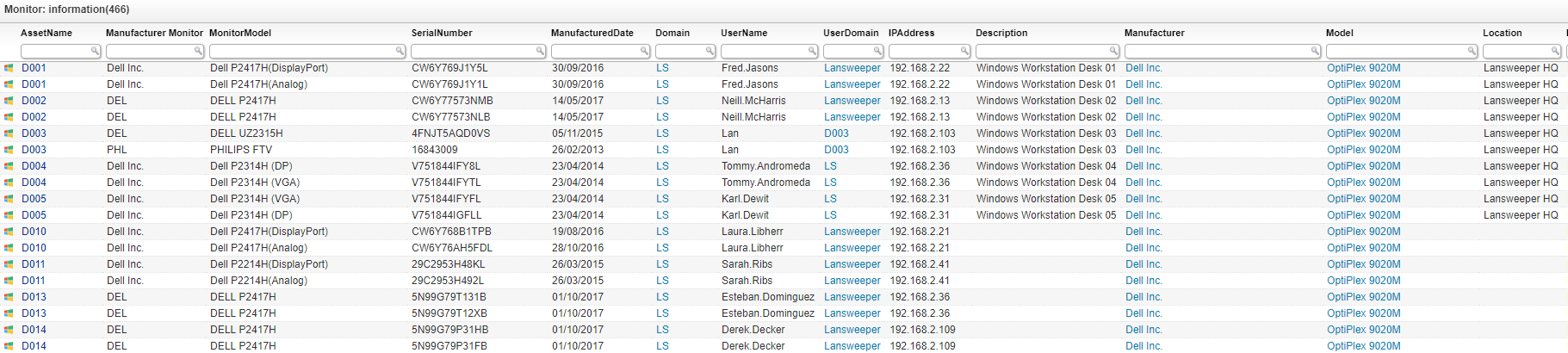
Select Top (1000000) tsysOS.Image As icon,
tblAssets.AssetID,
tblAssets.AssetName,
tblMonitor.MonitorManufacturer As [Manufacturer Monitor],
tblMonitor.MonitorModel,
tblMonitor.SerialNumber,
tblMonitor.ManufacturedDate,
tblAssets.Domain,
tblAssets.Username,
tblAssets.Userdomain,
tblAssets.IPAddress,
tblAssets.Description,
tblAssetCustom.Manufacturer,
tblAssetCustom.Model,
tblAssetCustom.Location,
tsysIPLocations.IPLocation,
tsysOS.OSname As OS,
tblAssets.SP,
tblAssets.Firstseen As [Created at],
tblAssets.Lastseen As [Last successful scan],
tblExtendedDisplayUni.SizeInInch,
tblExtendedDisplayUni.MaxResolution,
tblExtendedDisplayUni.AspectRatio,
tblExtendedDisplayUni.ResponseTimeInMs,
tblExtendedDisplayUni.HDType,
tblExtendedDisplayUni.DisplayTech,
tblExtendedDisplayUni.RefreshRate,
tblExtendedDisplayUni.Panel,
tblExtendedDisplayUni.HeightinCm,
tblExtendedDisplayUni.WidthInCm,
tblExtendedDisplayUni.DiagonalInCm,
tblExtendedDisplayUni.HasSpeakers,
tblExtendedDisplayUni.HasCamera,
tblExtendedDisplayUni.HasUsbHub,
tblExtendedDisplayUni.UsbUpstream,
tblExtendedDisplayUni.NrOfUsbUpstream,
tblExtendedDisplayUni.UsbTypeADownstream,
tblExtendedDisplayUni.NrOfVGA,
tblExtendedDisplayUni.NrOfDVI,
tblExtendedDisplayUni.NrOfHdmi,
tblExtendedDisplayUni.HDMIVersion,
tblExtendedDisplayUni.NumberOfDisplayPorts,
tblExtendedDisplayUni.DisplayPortVersion,
tblExtendedDisplayUni.EnergyClass,
tblExtendedDisplayUni.SDRPer1000u,
tblExtendedDisplayUni.AverageWattUsage,
tblExtendedDisplayUni.StandByWattUsage,
tblExtendedDisplayUni.MaxWattUsage,
tblExtendedDisplayUni.WattUsageWhenOff,
tblExtendedDisplayUni.WattPowerSave,
tblExtendedDisplayUni.ACVoltage,
tblExtendedDisplayUni.ACFreqInHz,
tblExtendedDisplayUni.CurrentInA,
tblExtendedDisplayUni.CreationDate
From tblAssets
Inner Join tblMonitor On tblMonitor.AssetID = tblAssets.AssetID
Inner Join tblAssetCustom On tblAssets.AssetID = tblAssetCustom.AssetID
Inner Join tsysOS On tblAssets.OScode = tsysOS.OScode
Left Outer Join tsysIPLocations On tsysIPLocations.LocationID =
tblAssets.LocationID
Left Outer Join tblExtendedDisplayUni On
tblExtendedDisplayUni.ExtendedDisplayUniId =
(Select tblAssetCustom.ExtendedDisplayUniId
From tblAssetCustom Join tblAssets On tblAssets.AssetID =
tblAssetCustom.AssetID
Where tblAssets.AssetUnique = 'Mon:' + tblMonitor.MonitorManufacturer +
':' + tblMonitor.SerialNumber)
Where tblAssetCustom.State = 1
Order By tblAssets.AssetName
Explore Lansweeper for free.
No credit card required.