

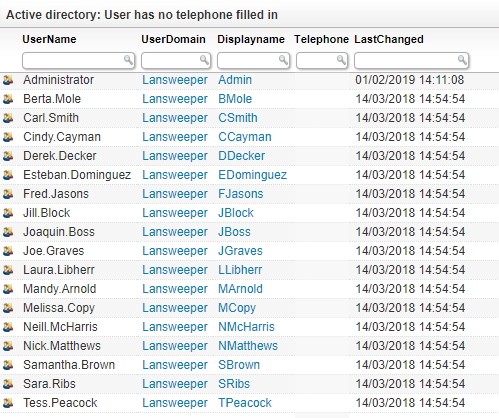
List all active directory users in your environment that do not have a phone number listed in their active directory information. This audit allows you to identify users who have missing information since Lansweeper scans a wide variety of AD user information. No need to use PowerShell or Command Line scripts, Lansweeper scans AD information without the need of any scripts of agents. Run the audit below and start taking action instantly.
Select Top 1000000 Case
    When tblADusers.Displayname Is Null Or
      tblADusers.Displayname = '' Then tblADusers.Userdomain + '\' +
      tblADusers.Username
    Else tblADusers.Displayname
  End As Displayname,
  tblADusers.Username,
  tblADusers.Userdomain,
  tblADusers.Telephone,
  'usersm.png' As icon,
  tblADusers.IsEnabled As EnabledInAD,
  tblADusers.Lastchanged
From tblADusers
Where (tblADusers.Telephone Like '' Or tblADusers.Telephone Is Null)
Order By Displayname
Explore Lansweeper for free.
No credit card required.