

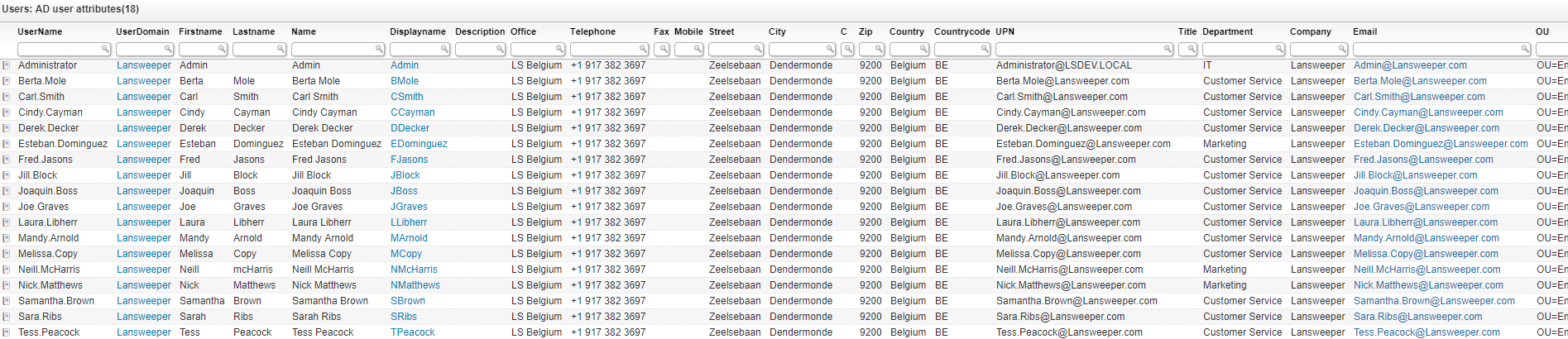
List active directory user attributes for all your AD users within Lansweeper. When AD users are scanned, most of their attributes are also retrieved which are included in this report. Details like job title, address, email, OU, employee info and more is all retrieved and can be filtered or sorted on to quickly find the employee you are looking for. Additionally, you can easily spot AD users who are missing information.
Select Top 1000000 Case
    When tblADusers.Displayname Is Null Or
      tblADusers.Displayname = '' Then tblADusers.Userdomain + '\' +
      tblADusers.Username
    Else tblADusers.Displayname
  End As Displayname,
  tblADusers.Username,
  tblADusers.Userdomain,
  tblADusers.Firstname,
  tblADusers.Lastname,
  tblADusers.Name,
  tblADusers.MiddleName,
  tblADusers.Initials,
  tblADusers.Description,
  tblADusers.Office,
  tblADusers.Telephone,
  tblADusers.Fax,
  tblADusers.Mobile,
  tblADusers.Street,
  tblADusers.City,
  tblADusers.C,
  tblADusers.Zip,
  tblADusers.Country,
  tblADusers.Countrycode,
  tblADusers.PostOfficeBox,
  tblADusers.UPN,
  tblADusers.Title,
  tblADusers.Department,
  tblADusers.Company,
  tblADusers.email,
  tblADusers.OU,
  tblADusers.Picture,
  tblADusers.HomePhone,
  tblADusers.Pager,
  tblADusers.IpPhone,
  tblADusers.State,
  tblADusers.HomePage,
  tblADusers.HomeDirectory,
  tblADusers.ProfilePath,
  tblADusers.LogonScript,
  tblADusers.whenCreated,
  tblADusers.whenChanged,
  tblADusers.EmployeeID,
  tblADusers.EmployeeNumber,
  tblADusers.EmployeeType,
  tblADusers.Info,
  tblADusers.Division,
  tblADusers.IsEnabled As EnabledInAD,
  tblADusers.ExpirationDate,
  tblADusers.LockoutDate,
  tblADusers.PasswordNeverExpires,
  tblADusers.PasswordLastSet,
  tblADusers.UserCannotChangePassword,
  tblADusers.PasswordRequired,
  tblADusers.PasswordExpirationDate,
  tblADusers.PasswordChangeableDate,
  'usersm.png' As Icon,
  tblADusers.Lastchanged
From tblADusers
Order By Displayname,
  tblADusers.Userdomain,
  tblADusers.Username
Explore Lansweeper for free.
No credit card required.