

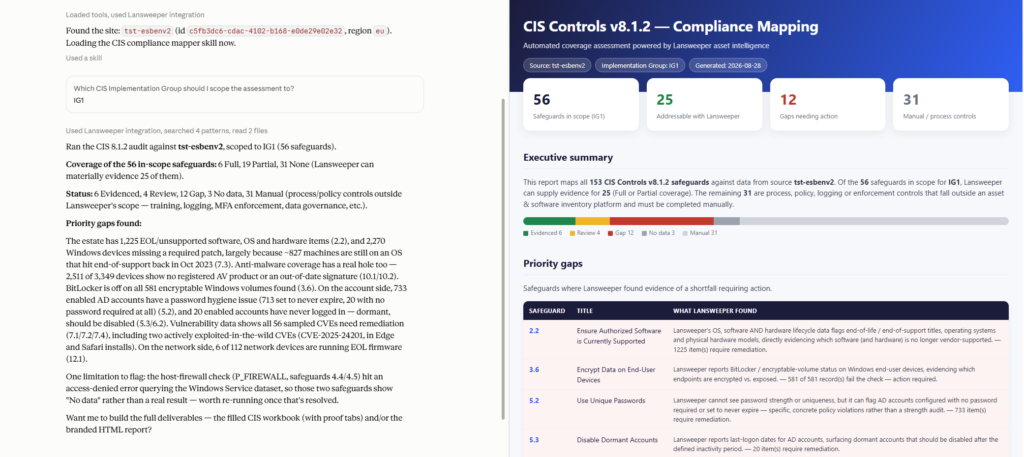
The CIS Compliance Mapper skill uses Lansweeper’s asset, software, and vulnerability data — or an uploaded inventory export — to classify all 153 CIS Controls v8.1.2 safeguards as Evidenced, Review, Gap, No data, or Manual. It auto-fills every safeguard the data can actually support, flags concrete shortfalls like EOL software, missing antivirus, unencrypted disks, or dormant accounts, and leaves process/policy/training controls honestly marked Manual rather than overstating coverage. The output is a filled compliance workbook and a branded executive HTML report, scoped to whichever Implementation Group (IG1, IG2, IG3, or ALL) you choose.
Can we actually prove this to an auditor?”
Evidence: which of the 153 safeguards does our inventory data really support, not just claim.
Defensibility: a workbook and report that names its data source honestly, including where the answer is “no data” or “manual.”
“What do we need to go fix?”
Gaps: the concrete shortfalls the assessment surfaces — EOL software, missing AV, unpatched CVEs, unencrypted disks, stale accounts.
Scope: which Implementation Group actually applies to us right now.
Lansweeper MCP
https://mcp.lansweeper.com/mcp
Lansweeper plan
Starter, Pro, Enterprise
LLM
Claude 3.5+, Gemini, ChatGPT, Copilot
Step 1 — Download
Download the skill package for your platform. Select Claude, ChatGPT, Gemini, or Copilot and the corresponding package downloads automatically.
Step 2 — Install
Step 3 — Connect Lansweeper (or provide data another way)
Step 4 — Ask
$cis-compliance-mapper or “assess my environment against CIS Controls v8.1.2.”