

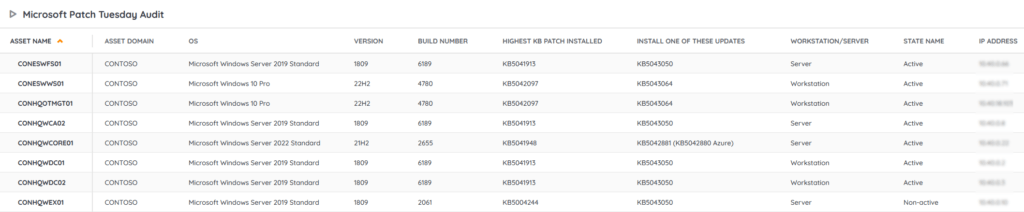
Lansweeper’s audit report for the Microsoft November 2024 Patch Tuesday report provides an overview of all Windows computers and their Windows patch status. Scan your network with our report to give you a quick and easy overview that allows you to find devices that might have issues receiving Microsoft updates. Detect outdated machines, start updating or simply manage your updating process in your network. Run our audit to keep your devices safe. In this month’s Patch Tuesday Microsoft brings 88 new fixes, 4 of which are listed as critical and 2 exploited. You can read all about the changes in the Patch Tuesday November blog post.
Run the Microsoft November 2024 Patch Tuesday Audit Now!
Select Distinct Top 1000000 Coalesce(tsysOS.Image,
  tsysAssetTypes.AssetTypeIcon10) As icon,
  tblAssets.AssetID,
  tblAssets.AssetName,
  tblAssets.Domain,
  SubQuery4.[Patch status],
  Case
    When tblComputersystem.Domainrole > 1 Then 'Server'
    Else 'Workstation'
  End As [Workstation/Server],
  tsysOS.OSname As OS,
  tblAssets.SP,
  tblAssets.Version,
  SubQuery4.Buildnumber,
  SubQuery1.PatchIDMax As [Highest KB Patch installed],
  SubQuery1.InstalledOn As [Installed On],
  SubQuery4.[Install one of these updates],
  Case
    When SubQuery4.[Patch status] = 'Up to date' Then ''
    When Convert(date,LatestEvent.EventTime) =
      Convert(date,SubQuery1.InstalledOn) Then 'Reboot might be required'
    When Convert(date,LatestEvent.EventTime) <
      Convert(date,SubQuery1.InstalledOn) Then 'Reboot is required'
    Else ''
  End As [Reboot Status],
  tblAssets.Username,
  tblAssets.Userdomain,
  tblAssets.IPAddress,
  tsysIPLocations.IPLocation,
  tblAssetCustom.Manufacturer,
  tblAssetCustom.Model,
  tblState.Statename As State,
  tblAssets.Lastseen,
  tblAssets.Lasttried,
  QuickFixLastScanned.QuickFixLastScanned,
  Case
    When tblErrors.ErrorText Is Not Null Or
      tblErrors.ErrorText != '' Then
      'Scanning Error: ' + tsysasseterrortypes.ErrorMsg
    Else ''
  End As ScanningErrors,
  Convert(nvarchar,DateDiff(day, QuickFixLastScanned.QuickFixLastScanned,
  GetDate())) + ' days ago' As WindowsUpdateInfoLastScanned,
  Case
    When Convert(nvarchar,DateDiff(day, QuickFixLastScanned.QuickFixLastScanned,
      GetDate())) > 3 Then
      'Windows update information may not be up to date. We recommend rescanning this machine.'
    Else ''
  End As Comment,
  Case
    When SubQuery4.[Patch status] = 'Up to date' Then '#d4f4be'
    When SubQuery4.[Patch status] = 'EOL, update to a higher Windows version'
    Then '#ffadad'
    Else '#ffadad'
  End As backgroundcolor
From tblAssets
  Left Join (Select tblassets.assetid,
      SubQuery2.Buildnumber,
      Case
        When tsysOS.OSname = 'Win 2008' Then
          'EOL, update to a higher Windows version'
        When tsysOS.OSname In ('Win 7', 'Win 7 RC', 'Win 2008 R2') Then
          'EOL, update to a higher Windows version'
        When tsysOS.OSname = 'Win 8' Then
          'EOL, update to a higher Windows version'
        When tsysOS.OSname = 'Win 2012' And SubQuery3.AssetID =
          tblassets.AssetID Then 'Up to date'
        When tsysOS.OSname = 'Win 8.1' Then
          'EOL, update to a higher Windows version'
        When tsysOS.OSname = 'Win 2012 R2' And SubQuery3.AssetID =
          tblassets.AssetID Then 'Up to date'
        When tsysOS.OScode Like '10.0.10240%' And SubQuery2.Buildnumber >= 20826
        Then 'Up to date'
        When tsysOS.OScode Like '10.0.10586%' Then
          'EOL, update to a higher Windows version'
        When (tsysOS.OScode Like '10.0.14393%' Or
          tsysOS.OSname = 'Win 2016') And SubQuery2.Buildnumber >= 7515 Then
          'Up to date'
        When tsysOS.OScode Like '10.0.15063%' Then
          'EOL, update to a higher Windows version'
        When tsysOS.OScode Like '10.0.16299%' Then
          'EOL, update to a higher Windows version'
        When tsysOS.OScode Like '10.0.17134%' Then
          'EOL, update to a higher Windows version'
        When tsysOS.OScode Like '10.0.17763' And tblOperatingsystem.Caption Not
          Like '%LTSC%' Then 'EOL, update to a higher Windows version'
        When tsysOS.OScode Like '10.0.17763' And tblOperatingsystem.Caption Like
          '%LTSC%' And SubQuery2.Buildnumber >= 6530 Then 'Up to date'
        When tsysOS.OScode Like '10.0.18362%' Then
          'EOL, update to a higher Windows version'
        When tsysOS.OScode Like '10.0.18363%' Then
          'EOL, update to a higher Windows version'
        When tsysOS.OScode Like '10.0.19041%' Then
          'EOL, update to a higher Windows version'
        When tsysOS.OScode Like '10.0.19042%' Then
          'EOL, update to a higher Windows version'
        When tsysOS.OScode Like '10.0.19043%' Then
          'EOL, update to a higher Windows version'
        When tsysOS.OScode Like '10.0.19044%' And SubQuery2.Buildnumber >= 5131
        Then 'Up to date'
        When tsysOS.OScode Like '10.0.19045%' And SubQuery2.Buildnumber >= 5131
        Then 'Up to date'
        When tsysOS.OSname = 'Win 2019' And SubQuery2.Buildnumber >= 6530 Then
          'Up to date'
        When tsysOS.OSname = 'Win 2022' And SubQuery2.Buildnumber >= 2819 Then
          'Up to date'
        When tsysOS.OScode Like '10.0.22000%' Then
          'EOL, update to a higher Windows version'
        When (tsysOS.OScode Like '10.0.22621%' Or
          tsysOS.OScode Like '10.0.22631%') And SubQuery2.Buildnumber >= 4460
        Then 'Up to date'
        When tsysOS.OScode Like '10.0.25398%' And SubQuery2.Buildnumber >= 1251
        Then 'Up to date'
        When tsysOS.OScode Like 'Win 2025' And SubQuery2.Buildnumber >= 2314
        Then 'Up to date'
        When tsysOS.OScode Like '10.0.26100%' And SubQuery2.Buildnumber >= 2314
        Then 'Up to date'
        Else 'Out of date'
      End As [Patch status],
      Case
        When tsysOS.OSname = 'Win 2008' Then 'EOL'
        When tsysOS.OSname In ('Win 7', 'Win 7 RC', 'Win 2008 R2') Then 'EOL'
        When tsysOS.OSname = 'Win 8' Then 'EOL'
        When tsysOS.OSname = 'Win 2012' And SubQuery3.AssetID <>
          tblassets.AssetID Then 'KB5046697'
        When tsysOS.OSname = 'Win 8.1' Then 'EOL'
        When tsysOS.OSname = 'Win 2012 R2' And SubQuery3.AssetID <>
          tblassets.AssetID Then 'KB5046682'
        When tsysOS.OScode Like '10.0.10240%' And SubQuery2.Buildnumber < 20826
        Then 'KB5046665'
        When tsysOS.OScode Like '10.0.10586%' Then 'EOL'
        When (tsysOS.OScode Like '10.0.14393%' Or
          tsysOS.OSname = 'Win 2016') And SubQuery2.Buildnumber < 7515
        Then 'KB5046612'
        When tsysOS.OScode Like '10.0.15063%' Then 'EOL'
        When tsysOS.OScode Like '10.0.16299%' Then 'EOL'
        When tsysOS.OScode Like '10.0.17134%' Then 'EOL'
        When tsysOS.OScode Like '10.0.17763' And tblOperatingsystem.Caption Not
          Like '%LTSC%' Then 'EOL'
        When tsysOS.OScode Like '10.0.17763' And tblOperatingsystem.Caption Like
          '%LTSC%' And SubQuery2.Buildnumber < 6530 Then 'KB5046615'
        When tsysOS.OScode Like '10.0.18362%' Then 'EOL'
        When tsysOS.OScode Like '10.0.18363%' Then 'EOL'
        When tsysOS.OScode Like '10.0.19041%' Then 'EOL'
        When tsysOS.OScode Like '10.0.19042%' Then 'EOL'
        When tsysOS.OScode Like '10.0.19043%' Then 'EOL'
        When tsysOS.OScode Like '10.0.19044%' And SubQuery2.Buildnumber < 5131
        Then 'KB5046613'
        When tsysOS.OScode Like '10.0.19045%' And SubQuery2.Buildnumber < 5131
        Then 'KB5046613'
        When tsysOS.OScode Like '10.0.19045%' And SubQuery2.Buildnumber >= 5131
        Then ''
        When tsysOS.OSname = 'Win 2019' And SubQuery2.Buildnumber < 6530 Then
          'KB5046615'
        When tsysOS.OSname = 'Win 2022' And SubQuery2.Buildnumber < 2819 Then
          'KB5046616 or KB5046698 (Azure)'
        When tsysOS.OScode Like '10.0.22000%' Then 'EOL'
        When (tsysOS.OScode Like '10.0.22621%' Or
          tsysOS.OScode Like '10.0.22631%') And SubQuery2.Buildnumber < 4460
        Then 'KB5046633'
        When tsysOS.OScode Like '10.0.25398%' And SubQuery2.Buildnumber < 1251
        Then 'KB5046618'
        When tsysOS.OSname = 'Win 2025' And SubQuery2.Buildnumber < 2314 Then
          'KB5046617'
        When tsysOS.OScode Like '10.0.26100%' And SubQuery2.Buildnumber < 2314
        Then 'KB5046617'
        Else ''
      End As [Install one of these updates]
    From tblassets
      Left Join tsysOS On tsysOS.OScode = tblassets.OScode
      Inner Join tblOperatingsystem On tblOperatingsystem.AssetID =
          tblassets.AssetID
      Left Join (Select tblAssets.AssetID,
          Case
            When IsNumeric(tblAssets.BuildNumber) = 1 Then
              Convert(bigint,tblAssets.BuildNumber)
            Else Null
          End As Buildnumber
        From tblAssets
        Where tblAssets.Assettype = -1) As SubQuery2 On tblassets.AssetID =
          SubQuery2.AssetID
      Left Join (Select Top 1000000 tblQuickFixEngineering.AssetID
        From tblQuickFixEngineering
          Inner Join tblQuickFixEngineeringUni On
              tblQuickFixEngineeringUni.QFEID = tblQuickFixEngineering.QFEID
        Where tblQuickFixEngineeringUni.HotFixID In ('KB5046697',
          'KB5046682','KB5046615')) As SubQuery3 On tblassets.AssetID = SubQuery3.AssetID)
  As SubQuery4 On tblAssets.AssetID = SubQuery4.AssetID
  Inner Join tblAssetCustom On tblAssets.AssetID = tblAssetCustom.AssetID
  Inner Join tsysAssetTypes On tsysAssetTypes.AssetType = tblAssets.Assettype
  Inner Join tblOperatingsystem On tblOperatingsystem.AssetID =
      tblAssets.AssetID
  Left Join (Select rankedEvents.AssetId,
      rankedEvents.EventTime
    From (Select tblUptime.AssetId,
          tblUptime.EventTime,
          Row_Number() Over (Partition By tblUptime.AssetId Order By
          tblUptime.EventTime Desc) As rn
        From tblUptime
        Where tblUptime.EventType = 1 And IsDate(tblUptime.EventTime) =
          1) As rankedEvents
    Where rankedEvents.rn = 1) As LatestEvent On tblAssets.AssetID =
      LatestEvent.AssetId
  Left Join tblQuickFixEngineering On
      tblAssets.AssetID = tblQuickFixEngineering.AssetID
  Left Join (Select Top 1000000 tblQuickFixEngineering.AssetID,
      Case
        When IsNumeric(Max(Right(tblQuickFixEngineeringUni.HotFixID, 7))) = 1
        Then Max(Cast(Right(tblQuickFixEngineeringUni.HotFixID, 7) As bigint))
        Else Null
      End As PatchIDMax,
      Max(Cast(tblQuickFixEngineering.installedon As date)) As InstalledOn
    From tblQuickFixEngineering
      Inner Join tblQuickFixEngineeringUni On tblQuickFixEngineeringUni.QFEID =
          tblQuickFixEngineering.QFEID
    Where Right(tblQuickFixEngineeringUni.HotFixID, 7) Not Like '%[^0-9]%' And
      IsDate(tblQuickFixEngineering.installedon) = 1
    Group By tblQuickFixEngineering.AssetID) As SubQuery1 On tblAssets.AssetID =
      SubQuery1.AssetID
  Inner Join tblState On tblState.State = tblAssetCustom.State
  Inner Join tblComputersystem On tblAssets.AssetID = tblComputersystem.AssetID
  Left Join tsysOS On tsysOS.OScode = tblAssets.OScode
  Left Join tsysIPLocations On tblAssets.IPNumeric >= tsysIPLocations.StartIP
      And tblAssets.IPNumeric <= tsysIPLocations.EndIP
  Left Join (Select Distinct Top 1000000 TsysLastscan.AssetID As ID,
      TsysLastscan.Lasttime As QuickFixLastScanned
    From TsysWaittime
      Inner Join TsysLastscan On TsysWaittime.CFGCode = TsysLastscan.CFGcode
    Where TsysWaittime.CFGname = 'QUICKFIX') As QuickFixLastScanned On
      tblAssets.AssetID = QuickFixLastScanned.ID
  Left Join (Select Distinct Top 1000000 tblErrors.AssetID As ID,
      Max(tblErrors.Teller) As ErrorID
    From tblErrors
    Group By tblErrors.AssetID) As ScanningError On tblAssets.AssetID =
      ScanningError.ID
  Left Join tblErrors On ScanningError.ErrorID = tblErrors.Teller
  Left Join tsysasseterrortypes On tsysasseterrortypes.Errortype =
      tblErrors.ErrorType
Where tsysOS.OSname <> 'Win 2000 S' And tsysOS.OSname Not Like '%XP%' And
  tsysOS.OSname Not Like '%2003%' And tblAssetCustom.State = 1 And
  tsysAssetTypes.AssetTypename Like 'Windows%'
Order By tblAssets.Domain,
  tblAssets.AssetName
Explore Lansweeper for free.
No credit card required.