Reports

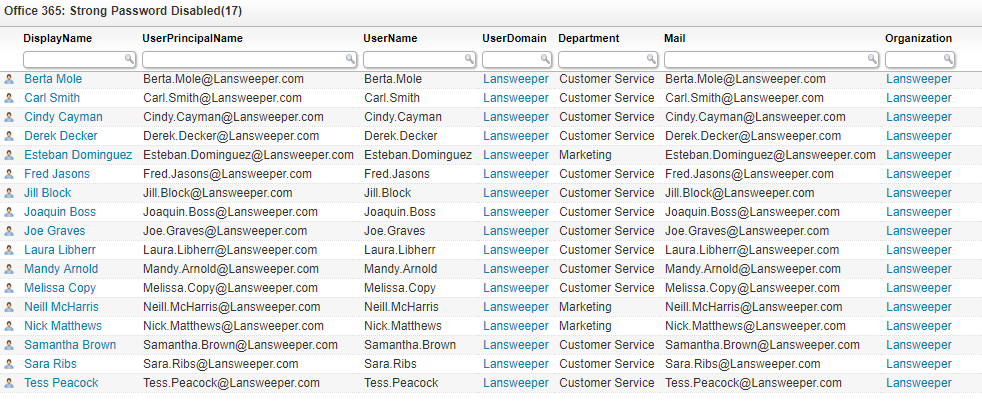
Office 365 Strong Password Disabled Audit

Discover All Users Without Required Strong Passwords

Find all users for which the strong password policy is disabled. Strong password policies are often implemented to prevent users from using simple or often unsafe passwords. The policy required users to choose a password with enough complexity for it to be considered safe. By using this audit, you can identify users who do not have this policy applied to them and might possibly be using an unsafe password. Once you have identified the users, you can take action and make sure that everyone is required to have a strong password. Office 365 Strong Password Disabled

Office 365 Strong Password Disabled Query

Select Top 1000000 'user.png' As Icon,
  tblO365User.DisplayName,
  tblO365User.UserPrincipalName,
  tblADusers.Username,
  tblADusers.Userdomain,
  tblO365User.Department,
  tblO365User.Mail,
  tblO365Organization.DisplayName As Organization,
  tblO365Organization.TenantId
From tblO365User
  Inner Join tblO365Organization On tblO365User.OrganizationId =
    tblO365Organization.OrganizationId
  Left Outer Join tblADusers On tblADusers.UPN = tblO365User.UserPrincipalName
Where tblO365User.PasswordPolicies = 'DisableStrongPassword'
Order By tblO365User.DisplayName

Show

Hide

Ready to get started?

Explore the full platform, free for 14 days.
No credit card required.

Need help evaluating?
Get guidance on pricing at scale and enterprise requirements.
Talk to sales
Clear pricing as you grow
Transparent plans that scale with your environment.
View plans & pricing