

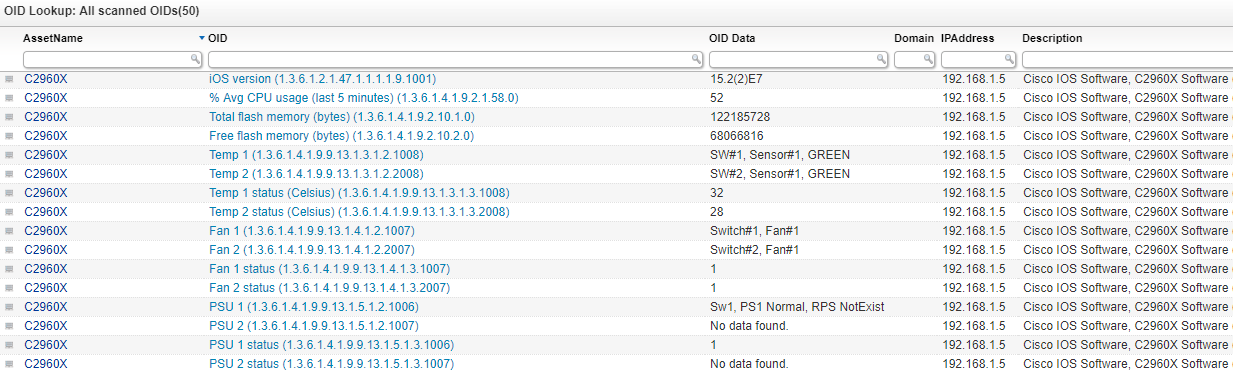
Discover all of the scanned custom OIDs from your network in one overview. This overview will provide a list of all the custom OIDs that have been scanned in your environment per asset. This also includes the data that was retrieved from the custom OIDs. By default, Lansweeper will already retrieve a lot of information from network devices using SNMP. Custom OID scanning allows users to scan additional specific information from devices.
Select Top 1000000 tblAssets.AssetID,
  tsysAssetTypes.AssetTypeIcon10 As Icon,
  tblAssets.AssetName,
  tblOIDData.Label As [OID Label],
  tblOIDData.[Key] As OID,
  tblOIDData.Data As [OID Data],
  tblAssets.Domain,
  tblAssets.IPAddress,
  tblAssets.Description,
  tblAssetCustom.Manufacturer,
  tblAssetCustom.Model,
  tblAssetCustom.Location,
  tsysIPLocations.IPLocation,
  tblAssets.Firstseen,
  tblAssets.Lastseen
From tblAssets
  Inner Join tblOIDData On tblAssets.AssetID = tblOIDData.AssetID
  Inner Join tsysAssetTypes On tsysAssetTypes.AssetType = tblAssets.Assettype
  Left Outer Join tblAssetCustom On tblAssets.AssetID = tblAssetCustom.AssetID
  Left Outer Join tsysOS On tsysOS.OScode = tblAssets.OScode
  Left Join tsysIPLocations On tsysIPLocations.StartIP <= tblAssets.IPNumeric
    And tsysIPLocations.EndIP >= tblAssets.IPNumeric
Explore Lansweeper for free.
No credit card required.