Microsoft Visual Studio 2022 Version 17.12 (LTSC channel) will be going end-of-life on the 14th of July, 2026. As one of the longest-running integrated development environments (IDE), Microsoft Visual Studio is used all over the world to develop software, websites, mobile apps, and more. Make sure to update all installations in your network to minimize security risks.
⚡ TL;DR | Go Straight to the Visual Studio and Team Foundation Server End of Life Audit
First released in 1997, Microsoft Visual Studio is one of the longest-running integrated development environments for creating software, websites, mobile apps, and more. Visual Studio includes an advanced code editor featuring syntax highlighting and code completion for variables, functions, methods, and more. Additionally, it includes a debugger for debugging applications and a designer. On top of all that, you can find a long list of additional modules for development, including data and server explorers to make managing databases and their connections easier.
Visual Studio Team Foundation Server (TFS) was first released in 2005 and was rebranded to Azure DevOps Server in 2019. TFS provides a comprehensive toolchain for team collaboration during the lifecycle of an application. It offers special tools for both development teams and operational teams, including tools for planning and tracking work, version control, project management, reporting, and testing and release management. Visual Studio subscribers also have access to a range of Azure DevOps features included in their subscription.
Currently, Visual Studio has 4 versions that are still supported: Visual Studio 2017, Visual Studio 2019, Visual Studio 2022, and Visual Studio 2026. TFS/ Azure DevOps has TFS 2017, TFS 2018, Azure DevOps Server 2019, Azure DevOps Server 2020, and Azure DevOps Server 2022.
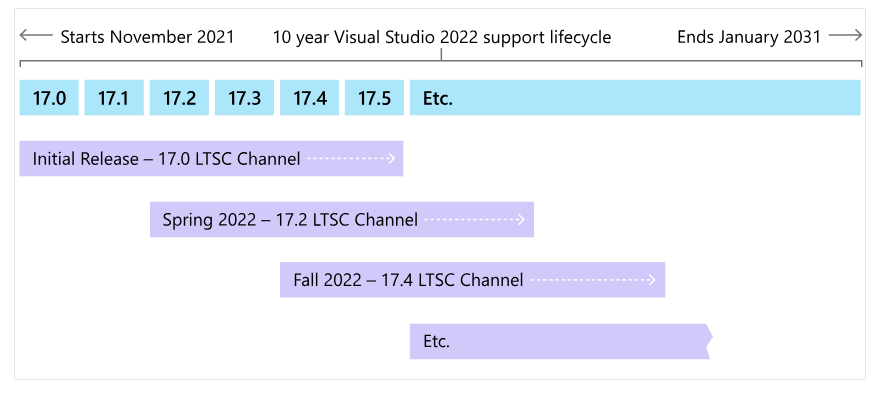
For most versions of Visual Studio and TFS, Microsoft uses its fixed lifecycle policy of 10 years. The first 5 years are mainstream support which includes feature updates, platform updates, security updates, and functionality fixes. The next 5 years of Extended support, offers only security updates.
Visual Studio 2026 is the first one to follow the modern lifecycle policy and offers 2 years of support for each new major version. The first year provides new features, platform updates, security updates, functionality fixes, and quality improvements. The second year is limited to only security updates to the Long Term Servicing Channel (LTSC). New major versions are released every year in November as in-place updates to the prior major version.
In addition to the version, there are also multiple editions of Visual Studio. While versions 2012-2017 have more than 3 editions, the primary editions for Visual Studio remain a free community edition, a professional edition, and an enterprise edition. Each edition has a slightly different feature set.
Lastly, Visual Studio has three channels, a Preview Channel, Current Channel, and a Long-Term Servicing Channel (LTSC). New features and bug fixes are introduced on the Preview Channel to allow users to provide early feedback. Once these features are deemed ready for widespread use, they are released on the Current Channel. Occasionally, Preview Features are also included in the Current Channel, giving users the opportunity to try out new features and share their feedback without requiring another installation. Lastly, Long-Term Servicing Channels (LTSC) are offered to provide development teams with more control over when they choose to adopt new feature releases.
Only LTSC versions are supported for longer periods while for Current Channels, only the most recent version is supported.
Visual Studio 2022 version 17.15 (current channel) will be going end of life on the 14th of July, 2026. Make sure to update your installations to version 17.14 (current channel) in order to stay supported and keep receiving updates. Aside from being supported, version 17.14 also includes additional features and updates including but not limited to:
With the multitude of supported versions, it can be difficult to keep tabs on when specific versions are no longer supported. To help with this, we’ve created a color-coded report that shows you which Visual Studio and TFS/Azure DevOps Server versions are end of life or will be going end of life. This allows you to prepare and update your installations before support is stopped. For Visual Studio 2022, the report looks at EOL dates of the LTSC versions.


Visual Studio 2022 version 17.10 (LTSC channel) will reach its end of life on the 13th of January, 2026. In order to remain supported, make sure to update your installations to version 17.12 (LTSC channel) or higher. Aside from being supported, version 17.12 also includes additional features and updates including but not limited to:
On July 8th, 2025, Visual Studio 2022 version 17.8 (LTSC channel) will reach its end of life. In order to remain supported, please update your installations to version 17.10 (LTSC channel) or higher. Aside from being supported, version 17.10 also includes additional features that you can benefit from, some examples being:
Visual Studio 2022 version 17.4 (LTSC channel) will go end of life on the 14th of January, 2025. In order to remain supported, please update your installations to version 17.8 (LTSC channel) or higher. Aside from being supported, version 17.8 also includes additional features that you can benefit from, including:
On July 11, 2024, Visual Studio 2022 version 17.4 (LTSC channel) will reach its end of life. In order to remain supported, please update your installations to version 17.6 (LTSC channel) or higher. Aside from being supported, version 17.6 also includes additional features that you can benefit from, some examples being:
Both Visual Studio 2013 and Visual Studio Team Foundation Server 2013 are going end of life on April 9, 2024. This applies to all updates of these products as well as their associated products, runtimes, and components. From that moment on there will be no more supported versions of these products. Microsoft highly recommends that you upgrade to a newer version of Visual Studio and TFS as the 2013 versions will no longer receive security updates. The latest version of Visual Studio is the 2022 version, for TFS that would be Azure DevOps Server 2022. You can find more information about the end of support for Visual Studio on Microsoft’s blog.
On the 9th of January 2024, Visual Studio 2022 version 17.2 (LTSC channel) will reach its end of life. In order to remain supported, please update your installations to version 17.4 (LTSC channel) or higher. Aside from being supported, version 17.4 also includes additional features that you can benefit from, some examples being:
Visual Studio 2022 version 17.0 is going end-of-life on July 11th, 2023. It is the first version of Visual Studio 2022 to reach its EOL. Make sure to update your installations to version 17.2 or higher in order to remain supported. Aside from being supported, version 17.2 also adds a list of new features that you can benefit from, including but not limited to:
Visual Studio 2012 will go end of life on January 10, 2023. This applies to all editions of Visual Studio 2012 and its associated products, runtimes, and components. This means that from that moment on there will be no more supported versions of this product. Microsoft highly recommends that you upgrade to a newer version of Visual Studio as 2012 will no longer receive security updates. You can find more information about the end of support on Microsoft’s blog.
Visual Studio 2019 version 16.9 will go end-of-life on October 11, 2022. To ensure your Visual Studio installation is fully supported it is advised to update to version 16.11 or higher. Aside from being supported, version 16.11 also adds a list of new features that you can make use of, including but not limited to:
Version 16.7 of Visual Studio 2019 went end-of-life on April 12, 2022. To ensure your Visual Studio installation is fully supported you should update to version 16.9 or higher. Aside from being supported, version 16.9 also adds a list of new features that you can make use of, including but not limited to:
Explore the full platform, free for 14 days.
No credit card required.