

VMware released a new security advisory regarding its virtual machine’s management tool. CVE-2020-3941, a local privilege escalation vulnerability, affects VMware tools version 10. To secure your network, it is advised you update your VMware Tools to version 11. With the audit below you can check if machines within your network are using VMware tools 10.
Discover if your VMware guests have an up to date VMware tools installed or if you still have vulnerable guests in your network. You can read more information about this vulnerability in our VMware Tools vulnerability blog post.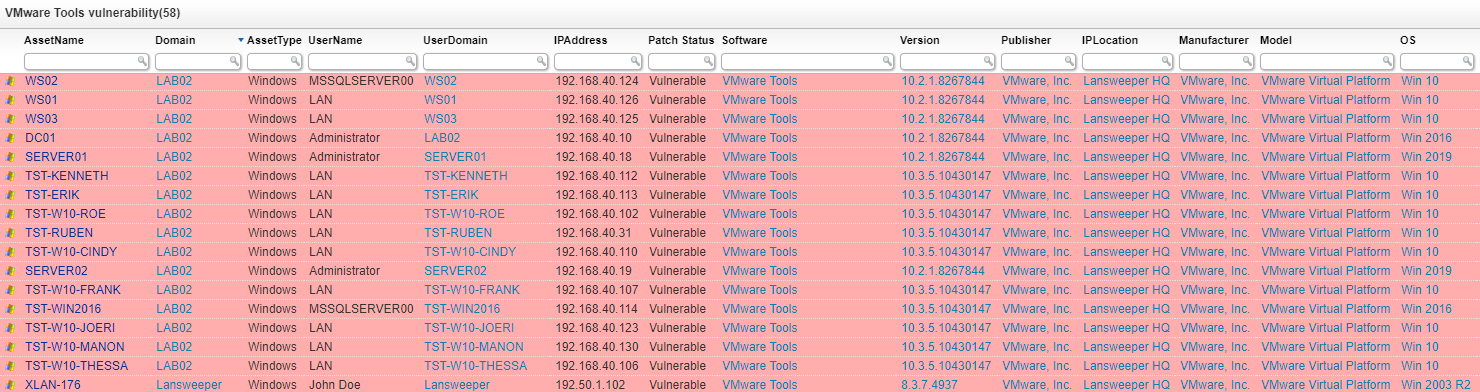
Select Top 1000000 tblAssets.AssetID,
  tblAssets.AssetName,
  tblAssets.Domain,
  tsysAssetTypes.AssetTypename As AssetType,
  tblAssets.Username,
  tblAssets.Userdomain,
  tsysAssetTypes.AssetTypeIcon10 As icon,
  tblAssets.IPAddress,
  Case
    When tblSoftware.softwareVersion Like '10%' Then 'Vulnerable'
    Else 'Not Vulnerable'
  End As [Patch Status],
  tblSoftwareUni.softwareName As Software,
  tblSoftware.softwareVersion As Version,
  tblSoftwareUni.SoftwarePublisher As Publisher,
  tsysIPLocations.IPLocation,
  tblAssetCustom.Manufacturer,
  tblAssetCustom.Model,
  tsysOS.OSname As OS,
  tblAssets.SP,
  tblSoftware.Lastchanged,
  tblAssets.Lastseen,
  tblAssets.Lasttried,
  Case
    When tblSoftware.softwareVersion Like '10%' Then '#ffadad'
    Else '#d4f4be'
  End As backgroundcolor
From tblAssets
  Inner Join tblAssetCustom On tblAssets.AssetID = tblAssetCustom.AssetID
  Inner Join tsysAssetTypes On tsysAssetTypes.AssetType = tblAssets.Assettype
  Inner Join tsysIPLocations On tsysIPLocations.LocationID =
    tblAssets.LocationID
  Inner Join tblState On tblState.State = tblAssetCustom.State
  Inner Join tblSoftware On tblAssets.AssetID = tblSoftware.AssetID
  Inner Join tblSoftwareUni On tblSoftwareUni.SoftID = tblSoftware.softID
  Left Join tsysOS On tsysOS.OScode = tblAssets.OScode
Where tblSoftwareUni.softwareName Like '%VMware Tools%' And tblState.Statename =
  'Active'
Order By Version
Explore Lansweeper for free.
No credit card required.