

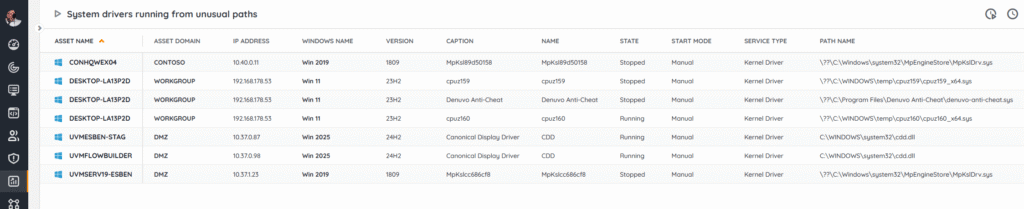
Use this report as a high-signal triage view to flag systems where drivers are loading from non-standard paths, a strong indicator of misconfiguration, sloppy packaging, or potential tampering/BOYD attacks. With per-device and per-driver context, grouped by domain and asset, you can decide whether to re-enable, reinstall, revert to a trusted source, or investigate signature/vendor/path anomalies. You can find more info on this use case in Pro Tips 74.
Run the System Drivers Running From Unusual Paths Report Now!
SELECT TOP 1000000
		a.AssetID,
		a.AssetName,
		a.Domain,
		Coalesce(os.Image, [at].AssetTypeIcon10) AS [icon],
		a.IPAddress,
		os.OSname AS OS,
		a.Version,
		sdu.Caption,
		sdu.Name,
		sd.State,
		sd.StartMode,
		sd.ServiceType,
		sd.PathName,
		ac.Manufacturer,
		ac.Model,
		sd.LastChanged,
		a.Lastseen AS [Last successful scan],
		a.Lasttried AS [Last scan attempt]
	FROM tblAssets a
	LEFT JOIN tblAssetCustom ac ON ac.AssetID = a.AssetID
	JOIN tblSystemDrivers sd ON a.AssetID = sd.AssetID
	JOIN tblSystemDriversUni sdu ON sd.SystemDriverUniID = sdu.SystemDriverUniID
	LEFT JOIN tsysAssetTypes [at] ON [at].AssetType = a.Assettype
	LEFT JOIN tsysIPLocations ipl ON a.IPAddress = ipl.IPLocation
	LEFT JOIN tsysOS os ON os.OScode = a.OScode
	LEFT JOIN tblState st ON st.State =	ac.State
	WHERE LOWER(st.Statename) = 'active' and PathName NOT LIKE '%\Windows\System32\drivers\%' and PathName NOT LIKE '%\Windows\System32\DriverStore\%' and sd.LastChanged > GetDate() - 7
	ORDER BY a.Domain, a.AssetName, sdu.Caption
Explore Lansweeper for free.
No credit card required.