

Lansweeper automatically scans for encryptable volumes on Windows
computers and with the audit, you can get discover the BitLocker status of your entire environment. Ensure that your data is safely secured with drive encryption and that no drives slip through and remain unencrypted. Find devices which are not encrypted so you can get them encrypted as soon as possible.
Run the BitLocker drive encryption Audit
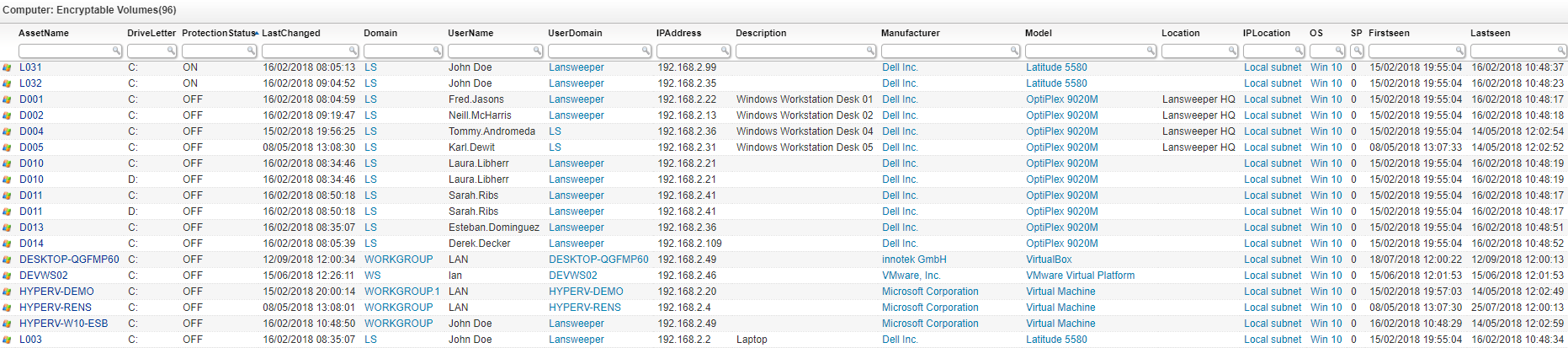
Select Top 1000000 tsysAssetTypes.AssetTypeIcon16 As icon,
  tblAssets.AssetID,
  tblAssets.AssetName,
  tblEncryptableVolume.DriveLetter,
  Case
    When tblEncryptableVolume.ProtectionStatus = 0 Then 'OFF'
    When tblEncryptableVolume.ProtectionStatus = 1 Then 'ON'
    Else 'UNKNOWN'
  End As ProtectionStatus,
  tblEncryptableVolume.LastChanged,
  tblAssets.Domain,
  tblAssets.Username,
  tblAssets.Userdomain,
  tblAssets.IPAddress,
  tblAssets.Description,
  tblAssetCustom.Manufacturer,
  tblAssetCustom.Model,
  tblAssetCustom.Location,
  tsysIPLocations.IPLocation,
  tsysOS.OSname As OS,
  tblAssets.SP As SP,
  tblAssets.Firstseen,
  tblAssets.Lastseen
From tblEncryptableVolume
  Inner Join tblAssets On tblEncryptableVolume.AssetId = tblAssets.AssetID
  Inner Join tsysAssetTypes On tblAssets.Assettype = tsysAssetTypes.AssetType
  Inner Join tblAssetCustom On tblAssets.AssetID = tblAssetCustom.AssetID
  Inner Join tsysOS On tsysOS.OScode = tblAssets.OScode
  Left Join tsysIPLocations On tblAssets.LocationID = tsysIPLocations.LocationID
Order By tblAssets.AssetName
Explore the full platform, free for 14 days.
No credit card required.