AI is already firmly embedded in your business. Developers install AI coding assistants. Teams experiment with new AI tools in their browsers. Staff upload data to external AI services to get things done faster. All of this is happening on corporate devices, over corporate networks, often with corporate data, and usually, unfortunately outside any formal approval process.
On paper, you might have AI policies, approved tools, and security controls. In reality, you are still guessing:
- Which AI tools are actually being used?
- Which assets and users are involved?
- What data might be leaving your environment?
- Are people following your policies or working around them?
Without clear answers, AI becomes a rapidly expanding, poorly understood source of risk. You are accountable for the outcome, whether you can see the activity that created it or not. Lansweeper’s AI usage tracking is designed to help you take back control.
The Problem: AI Is Expanding Outside Your Control
Currently, AI adoption inside the enterprise is not happening through controlled rollouts. It is happening fast and organically:
- Employees sign up for external AI services directly from their devices.
- Teams install AI desktop apps and browser extensions.
- Developers wire AI into their IDEs and workflows.
- Local AI model servers appear on powerful laptops and workstations .
Traditional tools can only show you pieces of the puzzle, because they weren’t built on a unified asset model:
- Software inventories show what is installed, not what is actually being used.
- Logs and SIEMs contain clues, but require manual correlation and lack asset context.
- Endpoint tools miss unmanaged devices and browser-based AI activity.
Most organizations cannot confidently explain which AI tools are being used, which assets are involved, or whether policies are being followed. Meanwhile, executives are asking hard questions about AI risk, compliance, and data exposure , and regulators are moving toward formal AI governance requirements. With frameworks like the EU AI Act, organizations will be expected to understand, document, and manage how AI is used across their environment..
You are being asked to govern AI without real visibility or control over how it is being used.
Introducing AI Usage Tracking in Lansweeper
AI Usage Tracking gives you a clear, asset-level understanding of how AI is actually used across your environment.
When enabled, Lansweeper IT Agents and IT sensors start collecting AI-related signals from Windows, Linux, and macOS devices, using the same discovery infrastructure you already rely on. External AI service connections are tracked over a rolling 14-day window. You gain visibility into AI software, AI-capable hardware, and active AI service connections, all from a single dashboard.
AI usage tracking helps you answer:
- Which AI services are we talking to? (e.g. OpenAI, Anthropic, Google AI, Microsoft Copilot)
- Which AI tools are installed locally? (e.g. ChatGPT desktop app, Cursor, Ollama, LM Studio, Stable Diffusion, TensorFlow, PyTorch)
- Where do we see AI in the browser and developer stack? (e.g. GitHub Copilot extensions, ChatGPT browser extensions, AI coding assistants in VS Code, Visual Studio, and JetBrains IDEs)
- Is anyone running local AI infrastructure or storing sensitive AI data or credentials on endpoints?
This is your starting point: a single, asset level view of AI activity that replaces guesswork and fragmented investigations, and a reliable understanding of what AI is actually doing in your environment.
What This Means in Practice
Executives are accountable for AI risk, compliance, and data protection. It is hard to defend your security posture when it is based on assumptions instead of evidence. With AI usage tracking, you gain:
- A continuously updated view of AI tools and services in use across the estate.
- Clear answers for leadership and regulators on where AI is running and where exposure may exist.
- A foundation for AI governance, with visibility that underpins policy, control, and compliance.
Directors and practitioners are the ones enforcing AI policy, managing risk, and investigating incidents. What they need is a complete view of AI activity. AI usage tracking helps them:
- Check whether usage aligns with approved AI tools and where shadow AI is creeping in.
- Identify AI activity on unmanaged devices, contractor machines, or endpoints outside existing controls.
- Investigate faster, using a single source of truth to see AI services, installed tools, browser extensions, and coding assistants alongside existing asset data.
A High-Level Look at AI Usage
AI usage tracking is designed to surface meaningful AI activity signals without turning your workflows into a configuration project. Instead of listing every signal type in detail, it focuses on three main questions:
- Which assets are talking to AI services?
You can see which devices are connecting to public AI platforms, with 14 days of history. This way you can spot trends, separate one-off experimentation from sustained use, and focus on the parts of the environment with the highest concentration of ongoing AI activity.
- Where is AI embedded in everyday tools and workflows?
By correlating installed applications, browser extensions, and development tools, you can distinguish between standard workstations and AI augmented endpoints where assistants, plugins, and IDE integrations are part of daily work. This lets you prioritize controls, hardening, and policy checks where AI is actually influencing code, content, and decisions.
- Where does local AI infrastructure and sensitive AI data exist?
AI usage tracking highlights endpoints running local model servers or storing AI related data and credentials. Security teams can quickly find systems hosting local AI workloads, locate stored API keys and tokens, and bring these assets into existing governance and monitoring processes.
Taken together, this high-level view makes AI activity across your estate understandable and actionable, without requiring you to manage every individual signal.
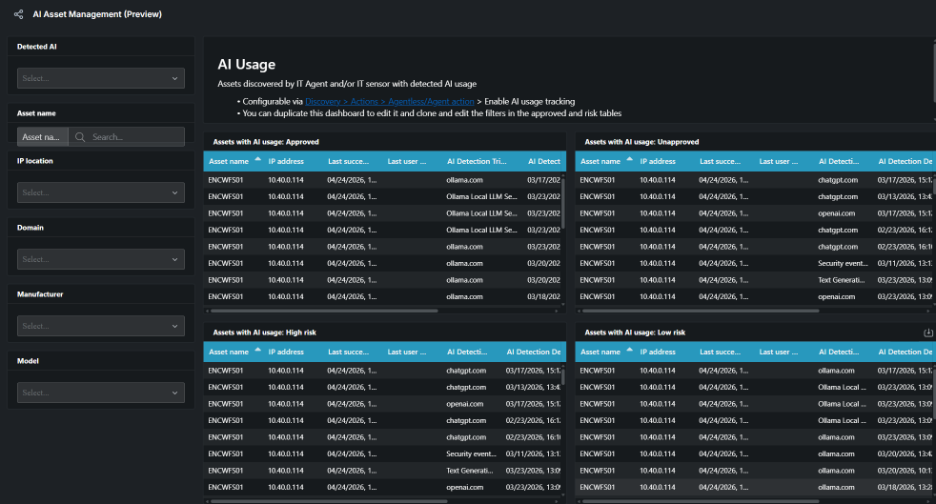
The AI Asset Management Dashboard: One View of All AI Activity
All of this information comes together in the AI Asset Management dashboard in Lansweeper.
This single, shared view of what AI is actually doing across the environment ensures that IT and Security are working from the same picture, without the need to reconcile competing lists and data sources.
From this single dashboard, IT and Security teams can:
- View AI tools, services, and activity across your environment.
- Filter by specific AI sources such as OpenAI, GitHub Copilot, or local model servers.
- Drill down to see which devices and segments are associated with which AI activities.
The default dashboard is preconfigured for the most common AI sources. You can duplicate and customize it by adding filters, views, and widgets tailored to your environment and AI policies.
Over time, this becomes the natural place your teams go when leadership asks, “Where are we using AI, and what does that mean for our risk?”
Get Started with AI Usage Tracking
AI usage tracking is now available in your Lansweeper console, but it is still disabled by default. If you would like to test this new feature, you can enable it separately for each discovery action.
This lets you keep control over where and how AI activity is monitored and lets you roll out AI visibility in a controlled way. Start with pilot groups, high risk segments, or specific business units, and expand the scope as your governance model matures.
For more information and a clear step-by-step guide, check out the Knowledge Base article.
Stop Guessing, Start Taking Control
Most organizations today are still guessing when it comes to AI. They assume policies are followed. They assume tools are used as intended. They assume exposure is limited. But they lack the data to prove it.
AI usage tracking in Lansweeper changes that. By introducing AI activity as a first-class data source, it gives IT and Security teams:
- Visibility into how AI is really being used across devices, browsers, and development environments.
- A single place to connect AI usage to assets, users, and risk.
- A practical starting point for AI governance that is grounded in reality, not theory.
AI is already shaping decisions, code, and data flows in your environment. The question is not whether it’s happening, but whether you understand it. With AI usage tracking in Lansweeper, you can finally stop guessing and start taking control.
Use Case
Lansweeper for AI Asset Management
Get a complete picture of your AI usage, tied to every asset in your environment.