Pro Tips #74
This month I follow up on an older Pro Tip. In Pro Tip 24 I covered the then newly added driver data and provided some reports for a basic overview of your drivers. However, driver information can be used for much more. It can be an indicator of technical issues on a device and it can also indicate risk if you know where to look.
We will be looking at 3 concrete examples of you can interrogate your driver data to find potential issues or risk:
- Auto/Boot system drivers not running
- System drivers running from unusual paths
- Printer drivers using non-default print processors
Obviously these are just examples, since the full driver data is yours you can use it however you like, take the reports provided below and adjust them to your needs!
Auto/Boot system drivers not running
Auto/Boot drivers are meant to load early and automatically because they provide foundational OS functions (disk, network, security, encryption, monitoring) or enforce controls before users can interact with the system. If one of these drivers isn’t running, it often signals a hidden problem, corruption or missing files, a failed update, driver signing issues, policy conflicts, or even tampering/malware trying to disable protections. The risks range from stability and performance issues (for example a storage or NIC features missing) or security gaps (AV/EDR, firewall, or disk encryption not active at boot).
In short: Auto/Boot drivers not running can be an early warning that something in the startup chain is broken or has been interfered with and something you’ll want to have a look at.
Additionally, there is great potential here with our new upcoming feature that is currently in beta, flowbuilder, where you can create notifications, tickets in your ITSM product and more using this data. Something I’ll have to follow-up on when its available for everyone.
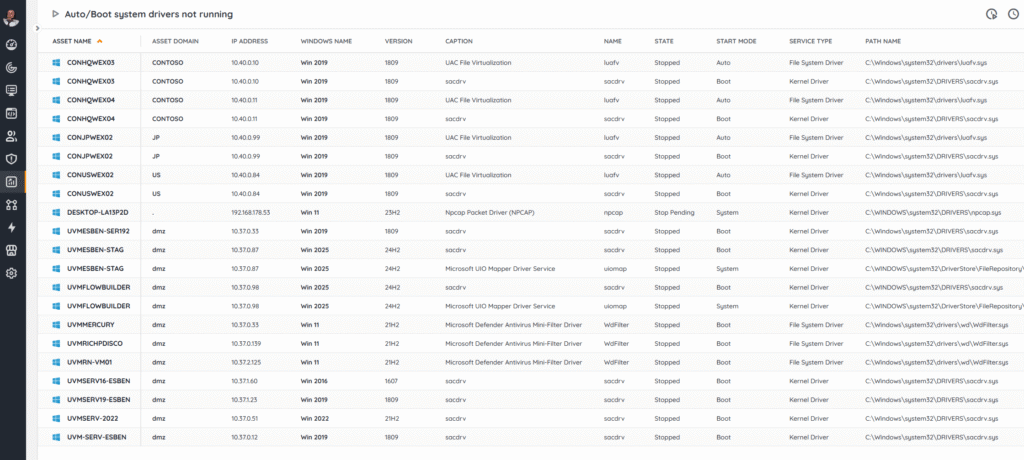
This report provides an overview of system drivers scanned in the last 7 days where the Start Mode is set to Boot, System, or Auto but the driver is not running.
I did exclude a few drivers that are designed to not run after boot (like WdBoot, hwpolicy, and dam) and you can adjust the report yourself to add more if you have them in your environment.
Auto/Boot System Drivers Not Running
System drivers running from unusual paths
System drivers usually live in protected, well-known locations like %SystemRoot%\System32\drivers and %SystemRoot%\System32\DriverStore\ and to load through trusted mechanisms. Seeing one run from an unusual or user-writable path (Temp, Downloads, user profile, random ProgramData subfolders, network shares, removable media, or other locations) is a red flag. At best, its just some misconfiguration or sloppy packaging, but at worst, someone trying to sidestepping allow-lists, bypassing integrity checks, or hiding from your EDR tool. It might even be an indicator of a “bring-your-own-vulnerable-driver” (BYOVD) attacks that load malicious or outdated kernel drivers from non-standard locations.
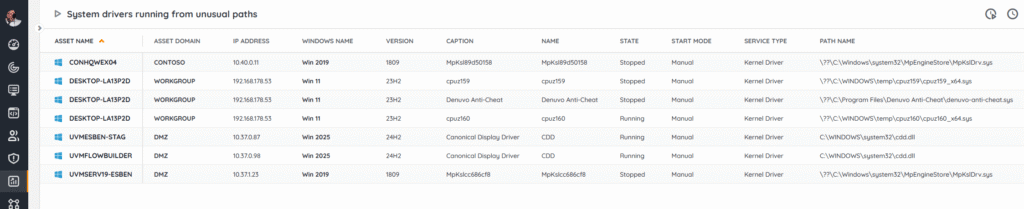
Our report provides you an overview of system drivers scanned in the last 7 days that are not located in Windows\System32\Drivers\ or Windows\System32\DriverStore\
Again, if you find drivers you don’t think are an issue, there is room to simply exclude those from the report.
System Drivers Running From Unusual Paths
Printer drivers using non-default print processors
Printer drivers are expected to use the default WinPrint processor. When a device installs or forces a non-default print processor, it runs print jobs through extra code that runs inside the privileged spoolsv.exe service. That can be sometimes legitimate (accounting/watermarking features), but it also expands the attack surface and is a known persistence/execution vector. This mean that at worst, it can be exploited to intercept/alter documents, exfiltrate data (e.g., “print-to-file” redirectors). Tooling and patches also assume WinPrint, so non-standard processors can break updates and auditing.
The report lists drivers scanned in the last 7 days where the Print Processor is not “WinPrint”.
Printer Drivers Using Non-Default Print Processors
Hopefully these reports are a basis for you to keep a closer eye on what drivers in your environment are doing and they prevent some headaches or long night in the future. And as I’ve mentioned before, at some point I’ll have to do another pass to show exactly how you can orchestrate or automate using this data.