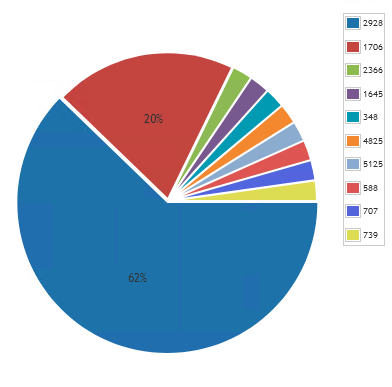
Lansweeper is able to provide you with data on the exact build of the Windows operating system. You can use this information to get a better overview of the patch level of your Windows 10 devices to ensure you meet your organization’s standards. You can read more about using this data in the Pro Tips blog post.
To use this in a chart widget, prefix the report name with “Chart:” and select it in the chart report widget found on a dashboard.
Windows 10 Build ChartQuery
Select Top 1000000 tblassets.BuildNumber,
Count(tblAssets.AssetID) As Total
From tblAssets
Inner Join tblAssetCustom On tblAssets.AssetID = tblAssetCustom.AssetID
Where tblAssetCustom.State = 1 And tblAssets.Assettype = -1 and tblassets.OScode like '10%'
Group By tblassets.BuildNumber
Order By Total Desc