

Get an Overview of Windows Updates

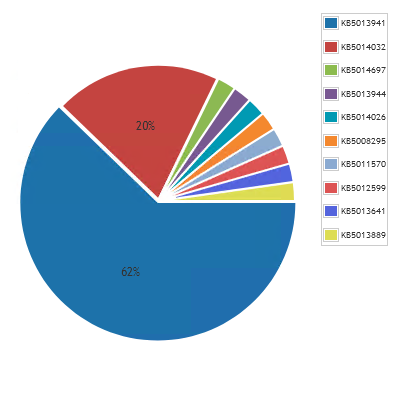
Lansweeper is able to provide you with data on which updates have been on your Windows devices. Using this update information, you can get an overview of the spread of the latest updates installed around your environment. This can be specifically useful when an update that includes an issue is released to quickly determine the percentage of impacted devices. You can read more about this in the Pro Tips blog post.
To use this in a chart widget, prefix the report name with “Chart:” and select it in the chart report widget found on a dashboard.
Windows KB patch chart

Windows Updates Chart Query

Select Top 1000000 sub1.lastPatch,
Count(tblAssets.AssetID) As Total
From tblAssets
Inner Join tblAssetCustom On tblAssets.AssetID = tblAssetCustom.AssetID
left join ( Select Top 1000000 Max(tblQuickFixEngineeringUni.HotFixID) As lastPatch,
tblQuickFixEngineering.AssetID
from tblQuickFixEngineering
Inner Join tblQuickFixEngineeringUni On tblQuickFixEngineeringUni.QFEID =
tblQuickFixEngineering.QFEID
group by tblQuickFixEngineering.AssetID) as sub1 on sub1.AssetID = tblassets.AssetID
Where tblAssetCustom.State = 1 And tblAssets.Assettype = -1 and sub1.lastPatch is not null
group by sub1.lastPatch
Order By Total Desc

Show

Hide

Ready to get started?

Explore the full platform, free for 14 days.
No credit card required.

Need help evaluating?
Get guidance on pricing at scale and enterprise requirements.
Talk to sales
Clear pricing as you grow
Transparent plans that scale with your environment.
View plans & pricing