
Is Your Business Ready for Windows 11?
Contents
⚡TL;DR Go straight to the Windows 11 Readiness Audit
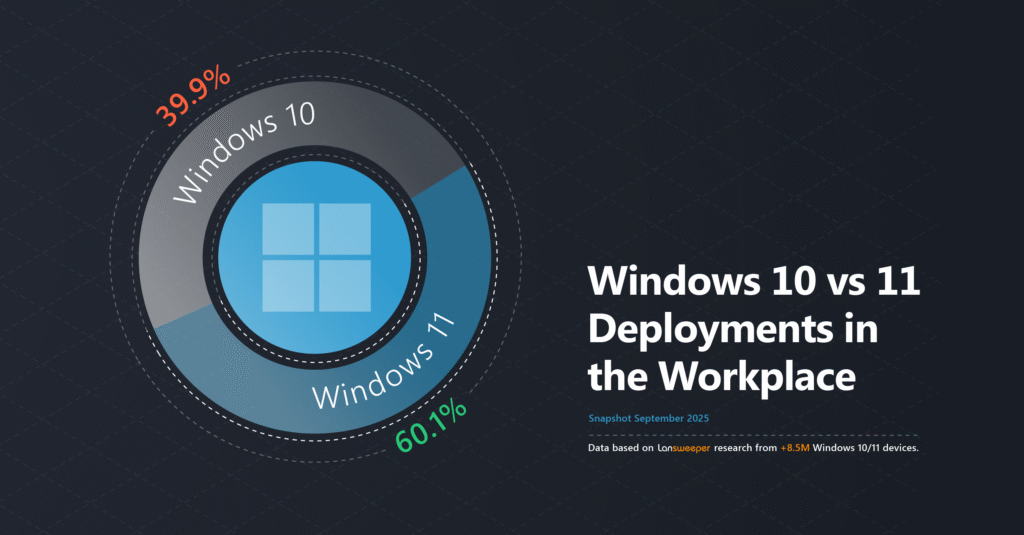
When Windows 11 was first released in 2021, adoption was hesitant. Its strict hardware requirements, compatibility concerns, and early issues led many organizations to delay migration. But with the Windows 10 End-of-Life (EOL) date just around the corner on October 14, 2025, the tide has turned. According to recent Lansweeper data from over 8 million Windows devices, Windows 11 has now overtaken Windows 10 in global enterprise usage by a substantial margin, a significant milestone in the shift toward modernized operating systems.
Windows 11 Surpasses Windows 10 Globally
Windows 11 usage in corporations has now surpassed the 50%-mark in all industries, with 60.1% of all deployments worldwide running Windows 11. This marks another sharp increase of 9.5% since July and 26.3% since the beginning of 2025. This sharp rise marks the most substantial migration surge to date, driven by Microsoft’s upgrade campaigns, new hardware rollouts, and of course the looming EOL deadline. But while global numbers are trending in the right direction, the reality is that this also means that 39.9% of all business devices are still running an OS that will no longer be supported in just a month.
The Risks of Inaction
Once Windows 10 reaches end-of-life on October 14, 2025, Microsoft will stop providing:
- Security updates
- Bug fixes
- Feature enhancements
Devices still on Windows 10 beyond that date will face growing cybersecurity risks, compliance violations, and compatibility gaps with modern tools and applications.
Although there are ways to continue using Windows 10 with Long-Term Servicing Channel (LTSC) or Long-Term Servicing Branch (LTSB) editions, in reality, we’ve seen these editions have historically had less than 4% market share within Windows 10.

Overcoming Windows 11 Migration Challenges
Given these findings, it’s clear that a lot of work still needs to be done to achieve Windows 11 readiness. The new operating system has more stringent system requirements than its predecessor, which can hinder migration organizations willing to migrate existing devices.
As an alternative, Microsoft provides the LTSC or LTSB editions of Windows 10, organizations that face difficulties due to the new Windows 11 requirements can make use of one of these longer supported editions to extend support up to 2029.
For enterprises with thousands of Windows machines, preparing for the Windows 11 upgrade is a massive task without automation and even worse without an up-to-date IT asset inventory. It would be impossible to find all the devices using manual processes, as many organizations have abandoned IT assets that are sitting idle but are still connected to the network. The reality is you can’t update machines you don’t know you have.
Microsoft does offer some tips on preparing for a smooth Windows 11 migration and has a PC health check tool intended for assessing the compatibility of PCs with Windows 11. However, without complete visibility across the IT estate, organizations could potentially waste hours – as well as a significant chunk of budget – manually inspecting machines, and that’s not counting the risk of missing outdated machines they don’t know about.
Assess Windows 11 Migration Readiness with Lansweeper
Fortunately, organizations using Lansweeper have access to a breadth of data that Microsoft’s health check tool can’t provide and IT teams can leverage that data to prepare for the Windows 11 rollout. With Lansweeper, IT teams can identify all connected Windows machines with little effort, and gain access to all of the data they need in minutes.
Lansweeper combines market-leading scanning technologies to scour the network and collect detailed information about every connected device. Using a combination of agent-based agentless and credential-free discovery, it finds all devices, provides granular information about system configurations, software versions, users, and more, and creates a comprehensive IT asset inventory of any IT, OT IoT or Cloud device. This makes it easy to pinpoint machines running old software and make a plan of action to either update or retire them.
Our experts created a Windows 10 End-of-Life Audit that provides an overview of all Windows 10 devices in your IT environment, including critical lifecycle data to give you an accurate overview of all devices that will require action.

Additionally, we have a Windows 11 Readiness Audit that you can run against the asset inventory to check for machines that are eligible for the Windows 11 upgrade. The report presents all the information in a visual, digestible format, making it easy to create a migration plan.
Having this information on hand will simplify and accelerate the rollout. That way your teams can use their time to focus on upgrading or retiring machines that don’t meet the new requirements, saving significant time and costs. Plus, it will reduce the risk of leaving outdated machines connected to the network.
Don’t wait until it’s too late. Get prepared now!
Windows 11 provides a host of new features and benefits to users, including an improved UI, support for efficient multitasking, better gaming, productivity apps, and more. Still, the transition will certainly strain IT teams as they scramble to update devices before the Windows 10 EOL. Lansweeper customers benefit from rapid access to all the information they need to take action while saving time and resources as they prepare for the organization-wide migration to Windows 11.
Get Started with Lansweeper
Discover assets you don’t even know about and learn why Lansweeper is used by thousands of organizations worldwide.
TRY NOW

Ready to get started?
You’ll be up and running in no time.
Explore all our features, free for 14 days.