

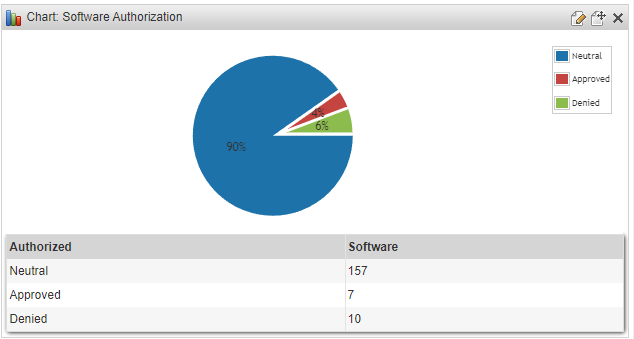
View the authorization status of software in your network easily with this chart. Lansweeper will automatically scan software within your network. Once your software has been scanned you use software authorization to mark software as approved or unauthorized on-premises. Once you’ve set up your software authorization you can use this chart to show you the status of your authorization. You can learn more about this in the Pro Tips 55 blog.
To use this in a chart widget, prefix the report name with “Chart:” and select it in the chart report widget found on a dashboard.
Select Top 1000000 Case
    When tblSoftwareUni.Approved = 2 Then 'Denied'
    When tblSoftwareUni.Approved = 1 Then 'Approved'
    Else 'Neutral'
  End As Authorized,
  Count(tblSoftware.softwareid) As Software
From tblSoftware
  Inner Join tblAssets On tblSoftware.AssetID = tblAssets.AssetID
  Inner Join tblSoftwareUni On tblSoftware.softID = tblSoftwareUni.SoftID
  Inner Join tblAssetCustom On tblAssets.AssetID = tblAssetCustom.AssetID
  Inner Join tsysOS On tblAssets.OScode = tsysOS.OScode
  Left Outer Join tsysIPLocations On tsysIPLocations.LocationID =
      tblAssets.LocationID
Where tblAssetCustom.State = 1 And tblAssets.Assettype = -1
Group By tblSoftwareUni.Approved
Explore Lansweeper for free.
No credit card required.