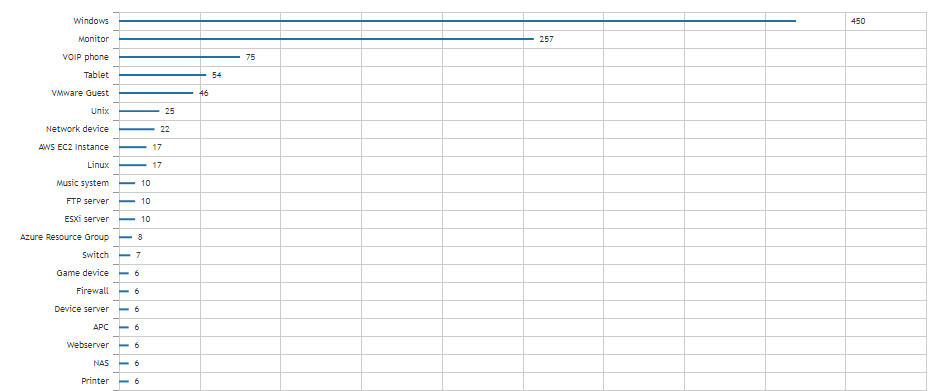
Get an Overview of the Types of Devices in Your Environment
Knowing what you have in your IT environment is always step one. With IT environments becoming more varied day by day, knowing what types of assets you have becomes just as important. With this chart report, you can have a quick overview of your asset types right on your dashboard so you always have the information available at a glance. Below you can find an example of one of the chart types that can be used in the chart report widget.
To use this in a chart widget, prefix the report name with “Chart:” and select it in the chart report widget found on a dashboard.
Asset Type Chart Query
Select Top 1000000 tsysAssetTypes.AssetTypename,
  Count(tblAssets.AssetID) As Total
From tblAssets
  Inner Join tblAssetCustom On tblAssets.AssetID = tblAssetCustom.AssetID
  Inner Join tsysAssetTypes On tblAssets.Assettype = tsysAssetTypes.AssetType
Where tblAssetCustom.State = 1 And tblAssets.Assettype <> 66
Group By tsysAssetTypes.AssetTypename
Order By Total Desc