This website uses cookies. By clicking Accept, you consent to the use of cookies. Click Here to learn more about how we use cookies.
Turn on suggestions
Auto-suggest helps you quickly narrow down your search results by suggesting possible matches as you type.
- Lansweeper Community
- Knowledge Center
- Knowledge Base
- Troubleshooting Scanning Issues
- WMI Access is denied. 0x80070005
Options
- Subscribe to RSS Feed
- Bookmark
- Subscribe
- Printer Friendly Page
- Report Inappropriate Content

Lansweeper

Lansweeper Tech Support
Options
- Article History
- Subscribe to RSS Feed
- Bookmark
- Subscribe
- Printer Friendly Page
- Report Inappropriate Content
on
11-14-2012
07:30 PM
- edited on
11-24-2023
11:35 AM
by
Nils
This page provides troubleshooting steps for "access denied" scanning errors encountered when using Lansweeper to pull data from Windows computers via WMI.

This page is for Lansweeper Classic. For Lansweeper Cloud, see WMI Access is denied. 0x80070005.
Lansweeper pulls Windows computer data from WMI (Windows Management Instrumentation), a management infrastructure built into Windows operating systems. When scanning Windows computers without a scanning agent, you may at some point encounter machines that return "access denied" scanning errors. These errors are usually caused by your scanning credential lacking administrative privileges on the client machine, but can be caused by incorrect DCOM or other settings as well.
To successfully perform an agentless scan with RequireIntegrityActivationAuthenticationLevel set to 1, KB5005033 or newer must be installed.
Troubleshoot the "access denied" error
- Make sure the client machine is running a non-Home edition of Windows.
Older versions of Windows Home operating systems cannot be scanned remotely and will need to be scanned with LsAgent or LsPush. Non-Home editions of Windows can be scanned remotely without issue.
- Make sure the client machine's OS is fully patched, as older Windows builds had issues with remote WMI access.
- Look at the Last scan attempt date in the computer's Summary tab in the Lansweeper Classic web console to determine when the scanning error occurred.
If the scanning error is not recent, rescan the computer first to verify whether the scanning issue is still present. To rescan the computer, go to Assets, select the computer and click Rescan. - Make sure the user account you submitted as a scanning credential in Lansweeper has administrative privileges on the client machine.
- Make sure you have the correct password for the user account and that the password has not expired.
You can re-submit the user account's password in the Lansweeper Classic web console to ensure it's correct. - Make sure the client machine's firewall is configured to allow WMI traffic.
If the machine uses Windows Firewall, read through the configuration instructions found in Configure Windows Firewall for agentless scanning of computers. - Make sure the computer meets the other Windows domain or workgroup scanning requirements.
You can download (right-click and Save Link As) and run this script within an elevated Command Prompt on a problem computer to ensure DCOM, Windows Firewall, and some other settings are correct. If you are using third-party firewalls, you will still need to check their configuration separately. - Run the testconnection tool found at
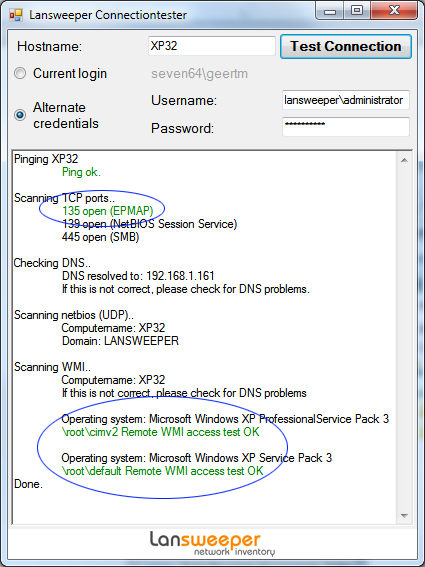
Program Files (x86)\Lansweeper\Actions\testconnection.exeon your Lansweeper scan server and submit the same scanning credentials used by Lansweeper.You must open the test tool on your Lansweeper scanning server, i.e. on the machine that has the Lansweeper Server service installed to replicate the exact network conditions experienced by Lansweeper. - In the test tool, verify that the computer name is resolving to the correct IP address and that the WMI part is green.
If the WMI part is green, Lansweeper should be able to scan the machine as well. - Make sure the local time is correctly configured on the client computer, the Lansweeper scanning server, and your domain controller.
A time difference of more than 15 minutes between the client and server can cause unexpected results in Active Directory domains. - Try removing the computer from your domain and re-adding it.
Was this post helpful? Select Yes or No below!
Did you have a similar issue and a different solution? Or did you not find the information you needed? Create a post in our Community Forum for your fellow IT Heroes!
More questions? Browse our Quick Tech Solutions.
25% helpful
(1/4)
New to Lansweeper?
Try Lansweeper For Free
Experience Lansweeper with your own data. Sign up now for a 14-day free trial.
Try NowNew to Lansweeper?
Try Lansweeper For Free
Experience Lansweeper with your own data. Sign up now for a 14-day free trial.
Try Now